⚡ TL;DR
The best EDC for men in 2026 starts with the items a normal day actually requires. Give your phone, keys, wallet, and any useful tool a defined place, then check the arrangement while sitting and moving. Choose one light around the job it serves. Add cutting tools only when they are useful, permitted, and practical to carry.
📋 Table of Contents
- 1. Give every item a job and a place
- 2. Build the layout around movement
- 3. Choose one primary light around its shape and role
- 4. Decide whether a knife-and-light combination simplifies the routine
- 5. Set a weight budget from the complete load
- 6. Reduce rubbing and crowding without promising indestructible jeans
- 7. Let the workday and the outdoor task have different kits
- 8. What is the best EDC bag for men?
- 9. Make charging and storage part of daily carry
- 10. Treat a laser as a specific tool, not an extra light mode for play
- 11. Frequently asked questions
Give every item a job and a place
Start with the objects that already leave home with you. Put the phone, keys, identification, payment method, and other necessary personal items on a table. Add the equipment you repeatedly need for work or ordinary errands. Keep occasional task equipment in a separate group so a rare use does not automatically become a permanent claim on a front pocket.
Ask what each additional item changes during an ordinary day. A light may help you find a dropped object or read a label. A tool may handle a suitable packaging task. An extra accessory may duplicate something already carried. The decision becomes clearer when you can name the job and the place where you expect to do it.
Men's clothing offers no universal pocket layout. Jeans, work pants, chinos, running clothes, and office trousers hold objects differently. A setup that works in one pair may feel crowded in another. Use the actual clothing you wear most often rather than treating a photo of someone else's pocket contents as a plan for your own day.
Multifunction devices deserve the same task check. The unique EDC gear for men guide describes combinations such as multi-source lights, pen lights, and phone thermal cameras. Identify which function you genuinely need, then decide whether it belongs in a pocket, a work bag, or a task kit kept nearby.
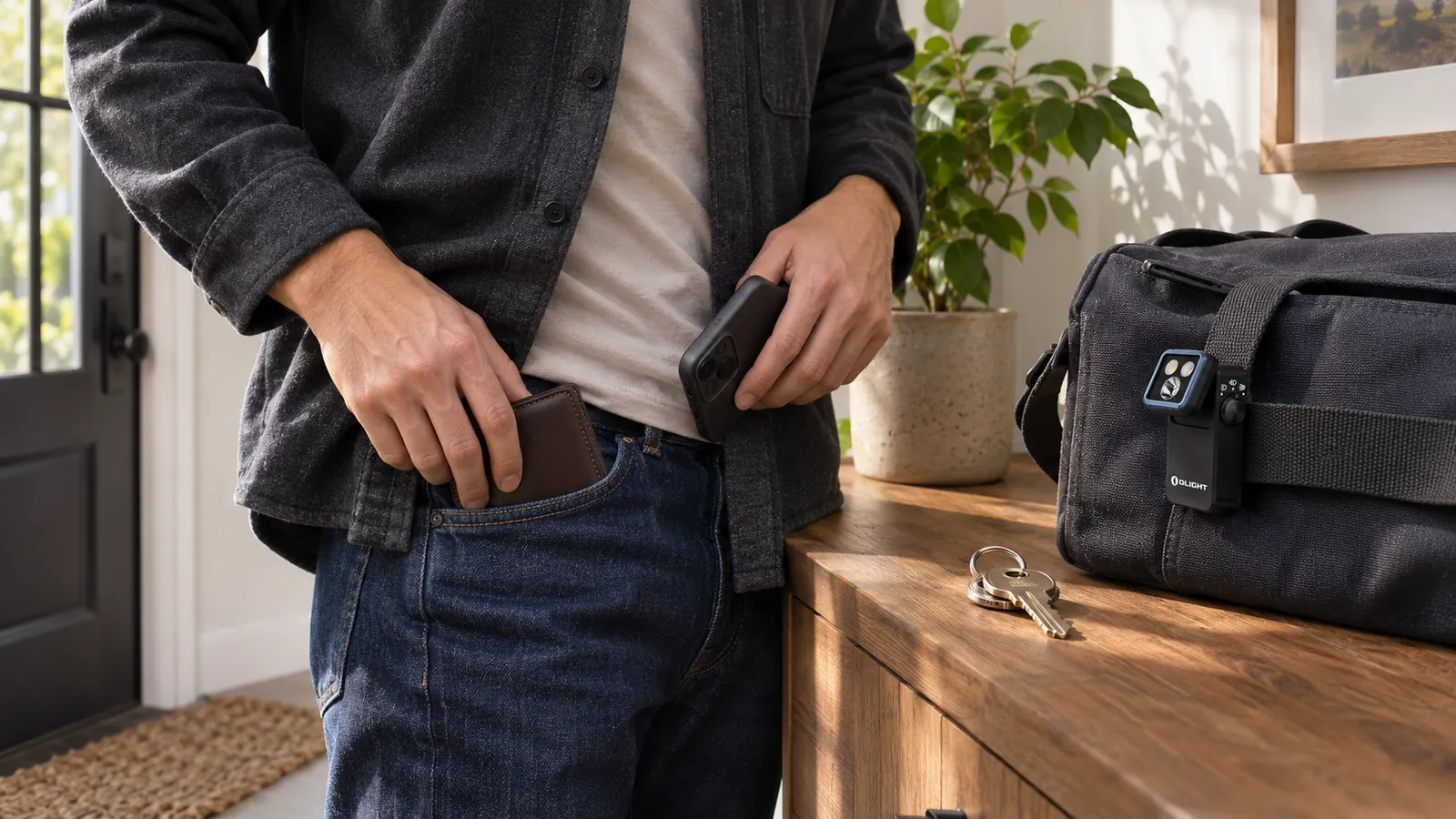
If your recurring lighting need is finding a keyhole or something inside a bag, a keychain light may fit that task. Include it in the complete keyring check rather than assessing it alone. A small accessory can still make a crowded collection awkward, so decide whether attachment to the keys genuinely improves access.
| Role | A practical starting point | Reason to reconsider the arrangement |
|---|---|---|
| Communication | Your ordinary phone | Other items block access or press against the screen |
| Keys and access | Only the keys and fobs needed that day | A crowded ring is uncomfortable or difficult to separate |
| Payment and identification | The necessary cards and documents | Old receipts and seldom-used contents create needless bulk |
| Ordinary visibility | One suitable portable light | Its shape, controls, or charging routine do not suit the day |
| Cutting or adjustments | An appropriate tool where it is needed and permitted | Destination rules or the task call for different equipment |
| Occasional work equipment | A defined bag or workstation kit | It occupies pocket space without a recurring reason |
Build the layout around movement
Choose a starting location for each item while everything is closed and safely secured. Keep the phone accessible without having to pull out several metal objects first. Place keys where they do not press against a screen or snag another item's controls. Give a clipped light enough space that reaching for something else does not dislodge it.
Then sit in the chair you normally use. Check whether an item presses into the hip crease, catches the edge of the seat, or makes the pocket feel crowded. Stand, bend normally, and put on the outer layer you expect to wear. These observations can reveal a poor location that feels acceptable during a few seconds of standing in front of a mirror.
Check access with the hand you naturally use for the task. A theoretically tidy arrangement is frustrating if you must pass the phone between hands or remove a wallet to reach a key. Change one location at a time so you can tell what helped. There is no requirement that a light, wallet, or keyring occupy the same side for everyone.
Include the belt, jacket, and bag straps in the check. An item can feel unobtrusive by itself and become awkward where a strap or garment seam crosses it. A pocket clip should sit on material suited to the product rather than being forced onto a delicate edge. If the location is unsuitable, move the item or use a better carrying arrangement.
A back pocket is worth checking whenever you will be seated. Do not assume that an item is comfortable simply because it is out of the way while standing. Consider moving a hard object to another suitable location before a drive or a long desk session. The aim is an arrangement that remains manageable through the day, without repeatedly emptying your pockets onto a nearby surface.
Choose one primary light around its shape and role
An EDC flashlight earns its space by answering a recurring visibility need. Decide whether you usually hold it, want it attached near a task, or need it available for a short walk or an ordinary errand. Shape, controls, and charging access matter alongside output. The largest advertised brightness number does not tell you whether it will sit comfortably beside your phone.
Baton 4 Pro: a cylindrical option
Baton 4 Pro is a conventional cylindrical option with side and tail controls. The current US description for the Matte Black CW configuration lists a body length of 111 millimeters and support for USB-C and MCC magnetic charging. Check the exact selected model and supplied charging equipment rather than assuming every package or related Baton model is identical.
Length is only one part of the pocket question. Check the space occupied by the body, head, clip, and nearby objects together. A cylindrical light may suit a narrow location, while a crowded pocket can still make it uncomfortable. Try the closed carrying arrangement in the actual garment, and assess both standing and seated access before deciding that a compact label settles the fit.
Consider how you will use the controls after retrieving the light. Familiarize yourself with the exact instructions in a suitable setting before relying on it during a task. Choose a carrying location that protects the controls from unwanted pressure. Follow the model's lockout guidance when storing it, without assuming that another flashlight's button sequence applies.
The current Baton 4 Pro description identifies five brightness levels through the side control and High and Turbo access through the tail control. For a nearby label or reflective surface, choosing a suitable lower level can make the task more manageable than immediately using maximum output. The two control locations also give you something specific to check when deciding how the light sits beside other pocket contents.
Its two charging options serve different routines. USB-C may suit a travel kit that already contains the appropriate cable and power source, while compatible MCC equipment can support a defined charging place at home. Check what is actually supplied and what is required. Having two supported methods does not mean every charger in a drawer is compatible or that the needed accessory is included in every package.
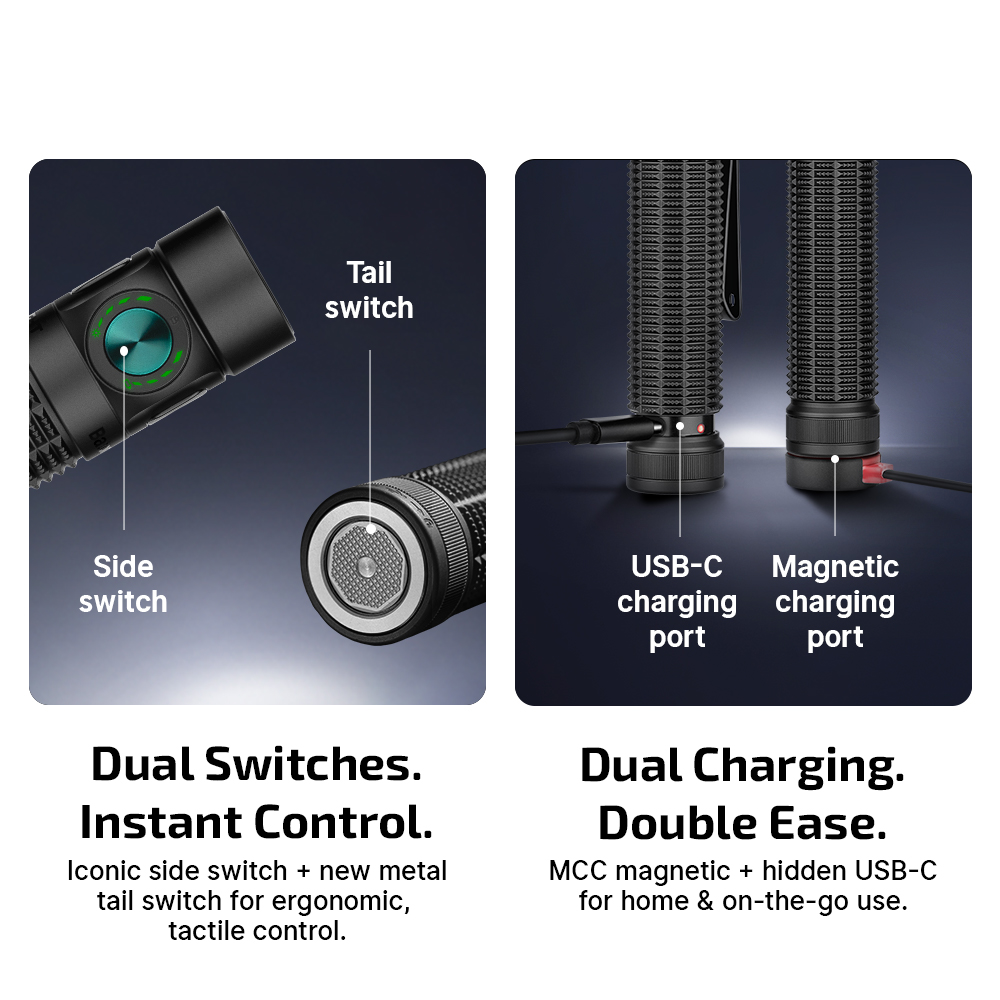
Official Baton 4 Pro detail: side and tail controls are separate from the USB-C and magnetic charging connections.
Arkfeld Ultra: a flatter shape with additional functions
Arkfeld Ultra combines white light, ultraviolet light, and a green laser in a flat body. That shape offers a different way to use pocket space from a cylinder. It still occupies width, and the clip and controls remain part of the arrangement. Flat does not mean weightless, invisible through every fabric, or comfortable beside every other object.
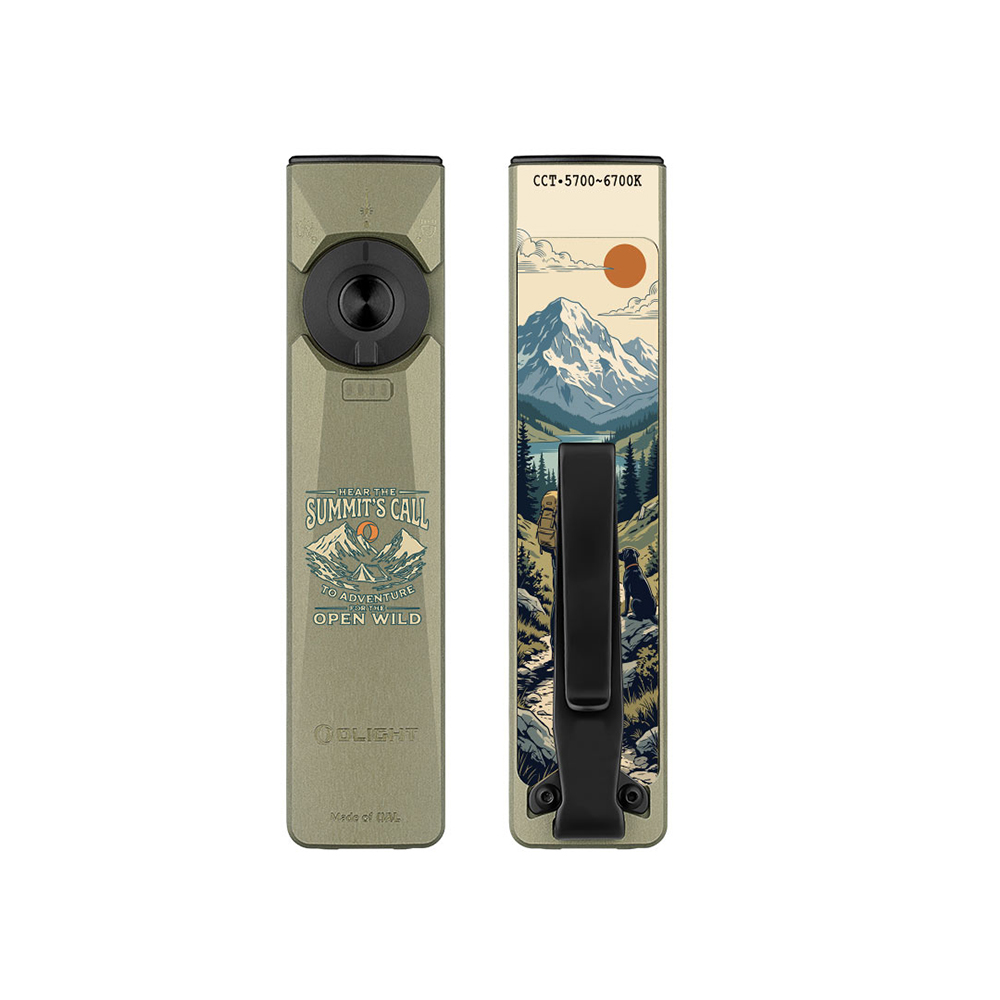
Official Trailbound Arkfeld Ultra front and rear views show the flat body, selector, and pocket clip.
Choose the additional functions for actual tasks. Ordinary visibility calls for the white light. A UV function or pointer should have a specific appropriate use, along with the instructions and precautions that go with it. If you would not otherwise need those functions, their presence alone is not a reason to add the device to an already crowded pocket.
For example, a person who regularly works with known fluorescent markings may have a reason for a UV function, while someone who needs to point at presentation material may have a different use for a pointer. Those are particular tasks with their own precautions and setting. They do not turn the extra sources into substitutes for white light or create a need to use every function on an ordinary walk.
Keep the light's role separate from a phone's role. Reaching for a light while holding a phone may be useful for a label or a dropped item, but both need manageable locations. Avoid stacking them together simply because their outlines look similar. Check whether you can remove either object without catching the other's clip or dragging it toward the edge of the pocket.
Oclip 2 Pro: move the attachment point when the task allows
Oclip 2 Pro offers a clip and independently adjustable head. It may suit a routine where the light needs to be attached at an appropriate point near an ordinary task. That is a different role from simply keeping a handheld light in a pocket. Decide where the attachment would genuinely be useful before choosing it for the feature alone.
The current model's head tilts through 115 degrees and the clip rotates through 360 degrees. The practical benefit is that finding a suitable attachment point and directing the light can be separate adjustments. A bag strap may face one way while a label or work surface sits another way. The official diagram shows those mechanical adjustments; it does not establish a secure fit on your particular bag or garment.
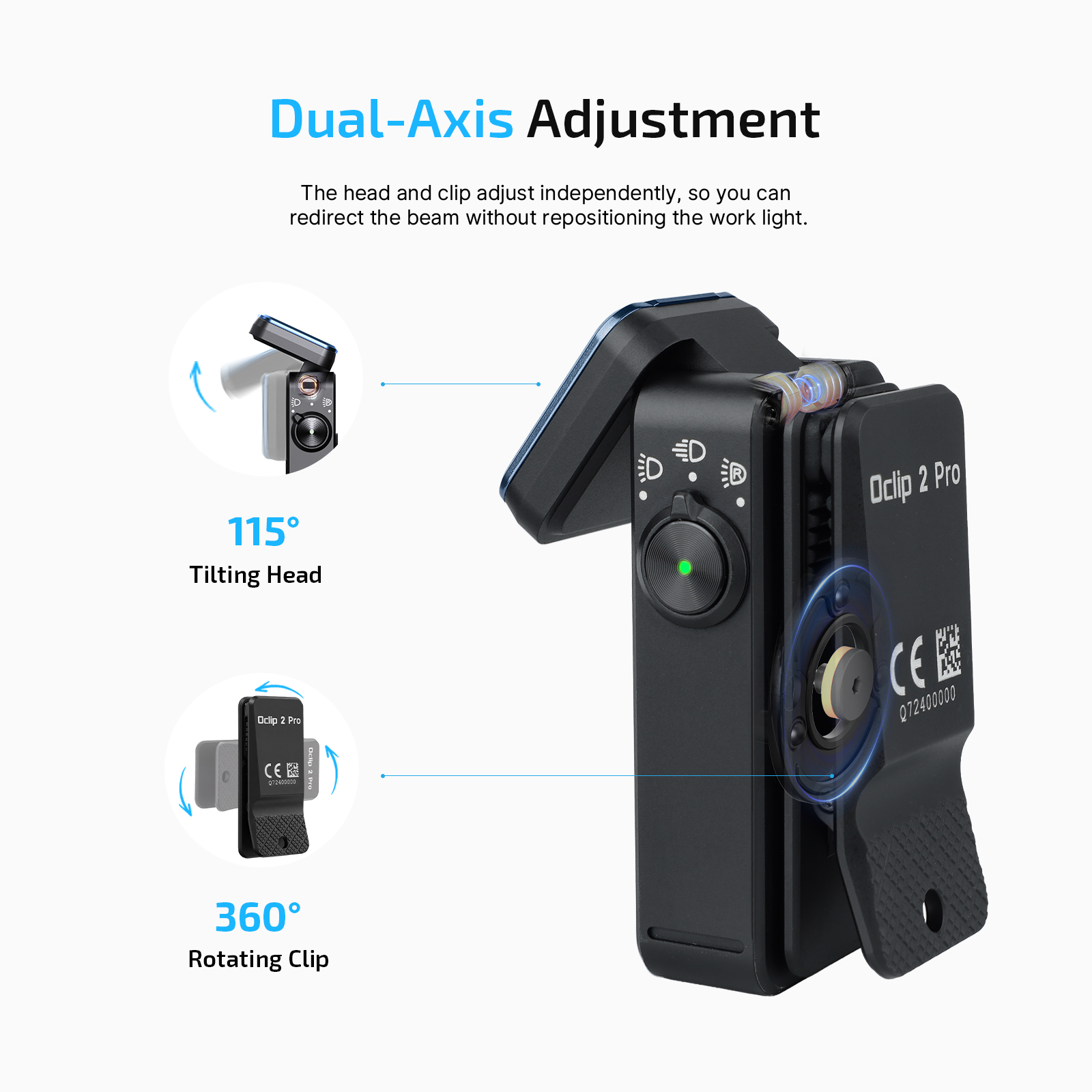
The independently adjustable head and clip allow the beam direction to be considered separately from the attachment position.
Check a clip location for security, comfort, and interference with movement. A shirt edge, bag strap, or suitable support behaves differently, and the surrounding material can shift. Keep the light clear of moving machinery, loose fabric, and places where it could fall into the work. A secure attachment and a useful lighting direction are two separate checks.
These are alternative ways to arrange a primary light, not a list of lights that need to be carried together. Start with the one role you use most often. Add another device only when a separate need remains clear after the ordinary day is organized. A second light kept in a work kit can be useful without becoming another object in your jeans.
Decide whether a knife-and-light combination simplifies the routine
OKNIFE LK combines a folding knife with a rechargeable light. That can consolidate two functions when both are needed and permitted in the same setting. It also means the functions travel together. A destination that does not permit the knife changes the usefulness of the combined item even if you only wanted the lighting function there.
Consider the whole routine rather than counting devices. If a separate light is already necessary for work, adding a knife-light combination may duplicate that function. If cutting tasks are rare, a suitable tool kept at the workstation may be more practical. Consolidation helps when the combined functions match the jobs and locations, not simply when the number of separate objects decreases.
Keep cutting tools closed and protected while carrying them, following their exact instructions. Check workplace and destination policies for the complete item, and consult the applicable official requirements for a legal question. A product's small size or ordinary utility purpose does not establish permission everywhere. Do not treat a clip, pouch, or bag compartment as a substitute for checking the rules.
For food, packaging, and fabric, choose tools suited to the actual material and the available work surface. Keep cleaning requirements in mind when an item includes electronics. A tool that has just cut adhesive tape is not automatically ready for food preparation, and a rechargeable combination should not be washed like a simple kitchen utensil without checking its instructions.
Set a weight budget from the complete load
Weighing a bare flashlight does not tell you what is in your pockets. A phone, wallet, keyring, case, clips, and accessories all contribute to the load. If you have a suitable scale, weigh the actual arrangement you intend to carry. Record what is included so a later comparison does not mix a bare product with a fully equipped keyring.
There is no single useful maximum that fits every person's clothing, job, and preferences. Start with the necessary items, then decide how much additional equipment remains comfortable and practical. An item that is acceptable in work pants may belong in a bag when you change clothes. Your own observations can guide the arrangement without turning a manufacturer's weight into a universal comfort threshold.
Remove duplication before replacing everything with lighter versions. Two bottle openers, several unused keys, and a thick stack of old receipts can create a problem that no new flashlight solves. Review what is actually present, including the small accessories attached to larger items. A modest collection can become surprisingly crowded when every object carries its own extra clip, ring, or case.
Keep the distinction between essential and occasional needs honest. Required work items, personal necessities, and equipment intended for a particular contingency should not be judged solely by how often they were used yesterday. Decide why an item belongs in the system and where it can be stored appropriately. Pocket space is one possible location, not the only way to keep useful equipment available.
Change one part of the load at a time. Moving an occasional tool into a work bag may tell you more than buying several replacements at once. Keep enough of the arrangement consistent to notice the effect. If the change creates a new problem, such as leaving necessary equipment behind when changing bags, resolve that workflow before declaring the lighter setup successful.
Reduce rubbing and crowding without promising indestructible jeans
Inspect the pocket area where hard objects make contact. Look at the clip location, seams, lining, and any place where an item presses outward when seated. A concentrated pressure point can be a reason to move the object or change its carrying arrangement. Do not assume every mark is caused by weight alone; the shape and position of the contact matter, too.
Keep objects from jostling against delicate items or crowded fabric. Separating keys from a phone can make access easier as well as reduce unwanted contact. A suitable organizer or pouch may help, but check the thickness it adds. A protective accessory that makes the entire pocket overcrowded can create a different comfort problem.
Follow the product's guidance for clips and carrying accessories. Do not bend a clip, remove hardware, or improvise an attachment because the current garment is unsuitable. Ask the manufacturer about approved alternatives if you need one. The useful solution may be a different pocket or bag, rather than changing the hardware to force a fit.
Check the garment's own condition and care instructions. A worn lining or damaged seam deserves attention independently of the equipment. Move the item out of an unsuitable location while addressing the garment problem. No ordinary carrying arrangement can guarantee that fabric will never wear, and a photograph of a new pair of jeans cannot establish how a setup will behave over time.
For a routine that changes between desk work and physical work, reconsider the arrangement when the clothing changes. A clipped item that was unobtrusive during a walk can become awkward while kneeling or leaning against a work surface. Keep equipment secure and follow the workplace's safety requirements. Comfort does not replace the rules for tools around machinery or other job-specific hazards.
Let the workday and the outdoor task have different kits
An office commute may require a phone, access keys, payment and identification, and a small light for ordinary visibility. The workplace may provide the tools needed for packaging or maintenance. Before adding a personal tool, ask whether it is permitted and whether an approved alternative already exists where the task happens. Carrying less can be the practical result of understanding the workplace.
Outdoor work can involve different clothing, protective equipment, and storage options. Keep the equipment required for the job in the arrangement the employer or task calls for. A personal pocket kit should not compete with safety gear or become loose equipment near machinery. Revisit attachment points when you add a jacket, harness, gloves, or another layer.
| Situation | Keep accessible | Consider another location |
|---|---|---|
| Ordinary commute | Phone, access items, necessary personal contents | Occasional tools that the destination does not permit or require |
| Desk work | Items you retrieve regularly | A crowded keyring or hard objects that press when seated |
| Suitable outdoor task | The light and approved equipment needed for that task | Unsecured objects or items that interfere with protective equipment |
| Travel or a restricted venue | Only equipment permitted for that trip | Items needing a different lawful packing or storage arrangement |
Avoid building a permanent load around the most demanding day you can imagine. A particular work assignment may justify a separate kit that would be unnecessary during ordinary errands. Keep that kit identifiable and ready for the relevant task. This approach can preserve useful equipment without turning every trip to a store into a reason to fill every pocket.
Give bag changes a simple check. If you move between an office bag and a weekend bag, know which items transfer and which stay with their task kit. Check important contents before leaving instead of relying on the appearance of a packed bag. An organized location is useful only when the needed item is actually there.
What is the best EDC bag for men?
The best EDC bag fits the actual load, the route, and the way you retrieve items. Look for an appropriate size, useful internal organization, comfortable carrying, and secure storage for the contents. Choose around the equipment you have decided to carry, rather than buying a large bag and treating every unused compartment as a reason to add something.
Check the bag while wearing the clothing and carrying the load you expect. Consider how it sits when walking, commuting, and setting it down at work. A bag that feels comfortable empty can behave differently when it contains a laptop, water, and a task kit. Verify any dimensions or device-fit claims against the actual items instead of relying on a model name alone.
Organize frequently used items separately from occasional equipment. A light or key should not require unloading the whole bag to reach it, while a sharp tool needs the protected storage appropriate to that product. Keep spare batteries, cables, and other accessories managed according to their instructions. A collection of loose parts is harder to inspect and maintain than a defined kit.
Consider whether the bag is shared or accessible to children. Keep cutting tools, laser-equipped devices, batteries, and small accessories out of unauthorized reach. Do not assume that a zipped compartment establishes secure storage. The right arrangement depends on who can access the bag and where it will be left throughout the day.
Make charging and storage part of daily carry
Choose a charging location you will actually use. Keep the correct equipment with the device and check the manufacturer's instructions for the exact model. A USB-C port, a magnetic charging connection, and a dedicated charging base are different arrangements. Do not assume one cable in a travel pouch serves every product simply because the devices are all rechargeable.
Keep charging contacts and equipment free of inappropriate clutter, following the product instructions. Loose keys, metal fragments, moisture, and damaged cables deserve attention before the next use. If a device behaves unexpectedly or becomes damaged, stop using it and seek the appropriate support. Do not keep an unreliable item in a crowded pocket because its remaining functions still seem useful.
Use the documented lockout or storage guidance to reduce the chance of unwanted activation. Set up the routine in a suitable place before putting a light into a bag or pocket. A switch pressed by another object can turn a tidy arrangement into a problem. Do not bury an operating light beneath fabric or other material, and keep children from experimenting with the controls.
At the end of the day, return equipment to its defined location rather than scattering it among several drawers. Check whether charging, cleaning, or another ordinary maintenance step is needed. A smaller kit with a reliable routine is easier to keep ready than a larger collection with unknown charge states and missing accessories.
Treat a laser as a specific tool, not an extra light mode for play
An Arkfeld Ultra's green laser has a different purpose and safety boundary from its white-light function. Keep it away from people's and animals' eyes, vehicles, and reflective targets, and never point it at aircraft. Do not use it as a pet toy or let children treat a multifunction light as a play device.
Use the white light for ordinary visibility. Follow the exact instructions for UV and laser functions, including the intended uses and precautions. A function being available on a device does not mean it belongs in a particular task. If you do not need it, leave it unused rather than looking for an opportunity to include it in the routine.
Before visiting a school, courthouse, workplace, or another restricted setting, check the actual policy for every item in the kit. Different functions on one object can matter to that decision. Do not rely on appearance, a short blade, or a small overall body as permission. Plan an appropriate storage or packing arrangement before the trip, and check current official travel requirements when flying.
Frequently asked questions
Changelog
- November 18, 2026: Product information and buying guidance reviewed.