A charging comparison should show where the connection is and which parts must travel with the light. Baton 4 Pro accepts USB-C on its body; Seeker 4 Pro uses its charging holster for that route; Perun 3 includes a dedicated MCC3 magnetic cable. These differences can matter more to a purchase than a familiar connector name.
TL;DR: Compare the complete route from power source to flashlight before buying. A USB-C port on the light, USB-C on a required accessory, and a dedicated magnetic connection create different packing decisions. Check the exact version, included equipment, source-side connector, and Olight's instructions. Supporting two charging methods does not mean every cable is supplied, every accessory is interchangeable, or every power source is suitable.
📋 Table of Contents
- 1. Compare the connection route first
- 2. Baton 4 Pro: direct USB-C without a charging holster
- 3. Seeker 4 Pro: USB-C belongs to the holster route
- 4. Perun 3: keep the specified magnetic cable with the system
- 5. Read both ends of a cable and the component between them
- 6. Published charging times do not make the kits interchangeable
- 7. Compare five buying situations
- 8. Make the purchase note specific enough to use
- 9. Keep the connection plan within its allowed conditions
- 10. Frequently asked questions
Compare the connection route first
Three specific models illustrate the choices: the matte-black cool-white Olight Baton 4 Pro, the matte-black cool-white Olight Seeker 4 Pro, and the black Olight Perun 3. The table follows the connection through the required equipment. It does not treat “USB-C supported” as a complete description of what the buyer will need at another desk or while traveling.
| Model and route | Where the light connects | Parts that belong in that route | Purchase question |
|---|---|---|---|
| Baton 4 Pro, USB-C | A concealed port on the flashlight | Light, suitable USB-C cable, appropriate source | Does the selected package include the cable intended for this route? |
| Seeker 4 Pro, USB-C | Through the compatible charging holster | Light, holster, USB-C cable, appropriate source | Will the holster travel with the light? |
| Perun 3, magnetic | The light's magnetic charging connection | Light, specified MCC3 cable, appropriate USB-A source | Is the correct magnetic cable available at the destination? |
| Optional magnetic routes | The exact light's compatible magnetic connection | The specified compatible cable and source | Is the accessory included or a separate purchase? |
The practical distinction appears when one component is left behind. A USB-C cable alone does not complete the Seeker's holster-based route. A USB-C socket on a power bank does not connect directly to the Perun's magnetic charging surface. A cable that fits a phone may be useful for the Baton's direct route only when it and the source meet the light's requirements. Trace the whole route rather than stopping at one familiar end.
This is a buying comparison, not a ranking of light output. The compact straight-body Baton, the larger Seeker, and the right-angle Perun also serve different lighting and carrying needs. Choose a suitable light for the actual task, then assess the charging equipment needed to support it. A convenient connection cannot make an unsuitable beam, body format, or operating condition the right choice.
Write the selected version beside the charging route. Baton 4 Pro is not Baton Ultra, Seeker 4 Pro is not Seeker Ultra, and Perun 3 is not Perun 3 Mini. A family name can conceal a different port location, accessory, battery, or package. Keep the exact model identity attached to the manual, shopping note, and spare-cable decision so that useful information is not applied to the wrong generation.
Baton 4 Pro: direct USB-C without a charging holster
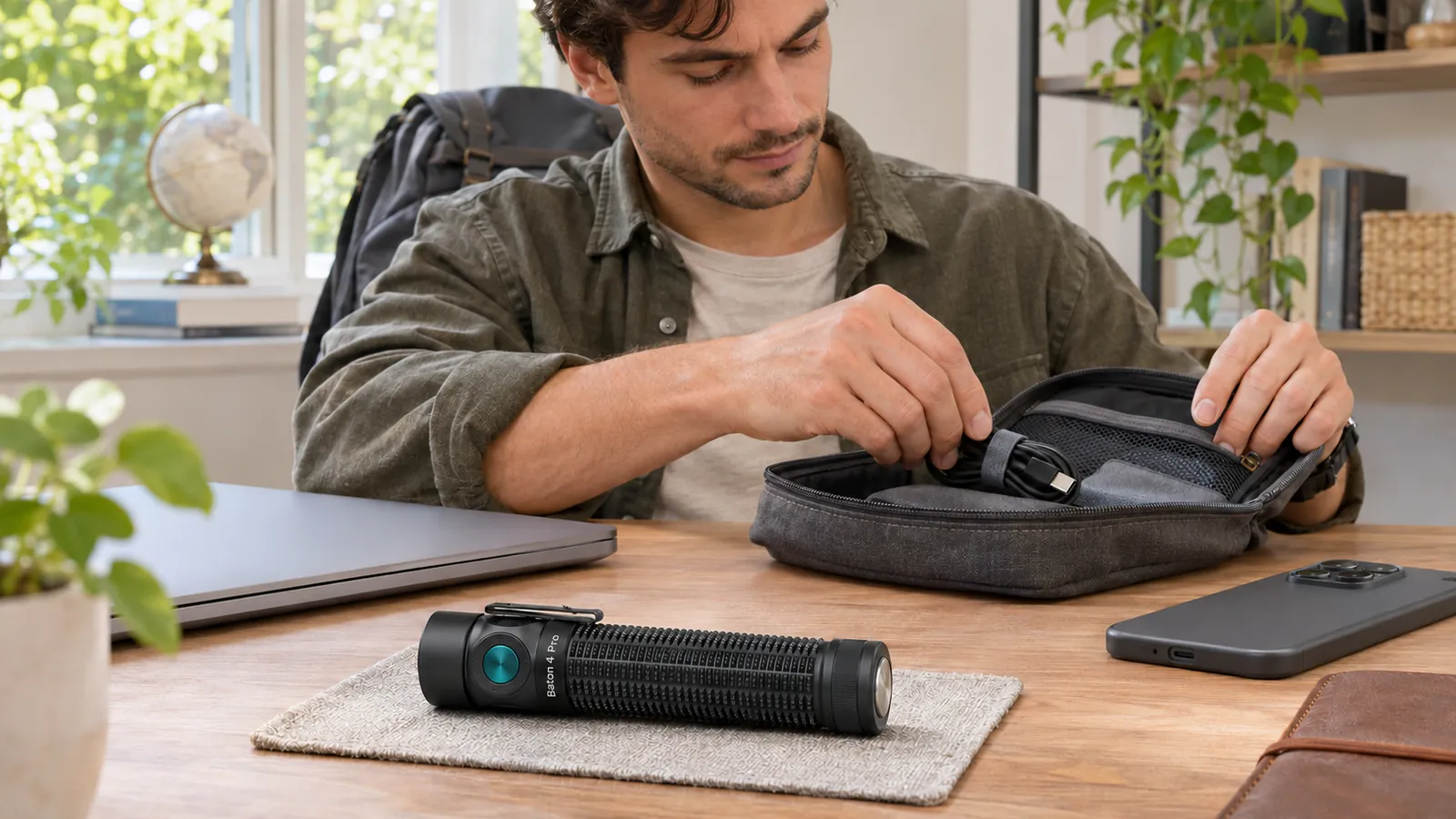
The Baton 4 Pro's hidden USB-C port is on the light itself, behind its rotating tailcap ring. That placement addresses a specific travel problem: the USB-C route does not require a separate charging holster. Someone moving a small light between a home desk and another workspace can evaluate a body-and-cable arrangement instead of planning space for an additional charging accessory. The source and cable still need to be appropriate for the model.
Port location is worth examining before purchase. A product photograph showing a closed cylindrical body may not reveal a concealed connection immediately. The charging port and the metal tail switch are different parts, even though both are near the tail. Use the exact manual and product illustration to identify them. Do not assume that a circular metal surface is a USB socket or that a tail control is itself a cable connection.
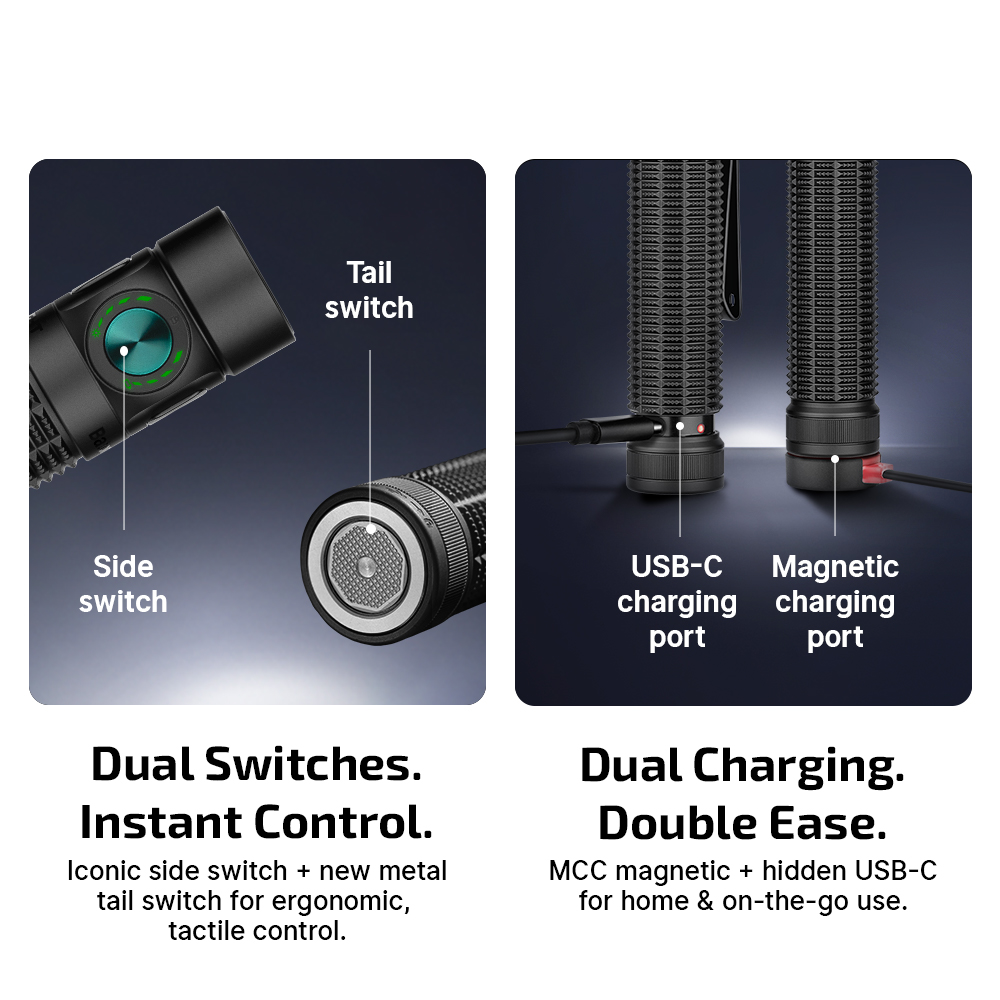
Official Baton 4 Pro charging-interface diagram. USB-C connects to the light body, while magnetic charging uses its separate connection; use the exact manual for the port cover and charging arrangement.
The direct port can reduce dependence on one particular accessory, but it does not remove all equipment from the kit. A suitable cable must reach the intended power source without an awkward pull on the light. Its source-side plug must fit the available socket. If the usual charging cable is normally left with a phone or laptop, decide whether it will actually be available when the flashlight needs it.
The selected-SKU packing photograph shows magnetic charging equipment and an L-shaped stand. That is useful context for understanding the offered system, but a buyer should still confirm the exact package contents rather than assuming a separate USB-C lead or wall adapter is supplied. Supporting a route and including every part for that route are different statements. Compare the actual selected offer with the equipment already owned.
The Baton's lighting role also belongs in the decision. Its compact body and separate side and tail controls suit a different carrying arrangement from a right-angle headlamp or a larger holstered light. Charging convenience is useful when it supports that intended role. There is little benefit in selecting a small direct-port light solely to save an accessory if the actual task requires a different lighting format.
Seeker 4 Pro: USB-C belongs to the holster route
For Seeker 4 Pro, the US product description specifies USB-C charging with the holster or magnetic charging using an optional MCC3 cable. The holster therefore has a functional charging role, beyond protecting or carrying the light. If USB-C is the route chosen for a destination, the appropriate holster must be part of the equipment brought there. A cable packed without it leaves a missing link in that particular arrangement.
The official image makes the difference visible. In the USB-C example, the cable connects to the holster with the light in it. In the magnetic example, the optional charging cable connects to the light. These are two distinct routes, not two sockets to look for on the same part of the flashlight body. A purchase comparison should show which component receives the cable instead of giving both methods a single undifferentiated check mark.
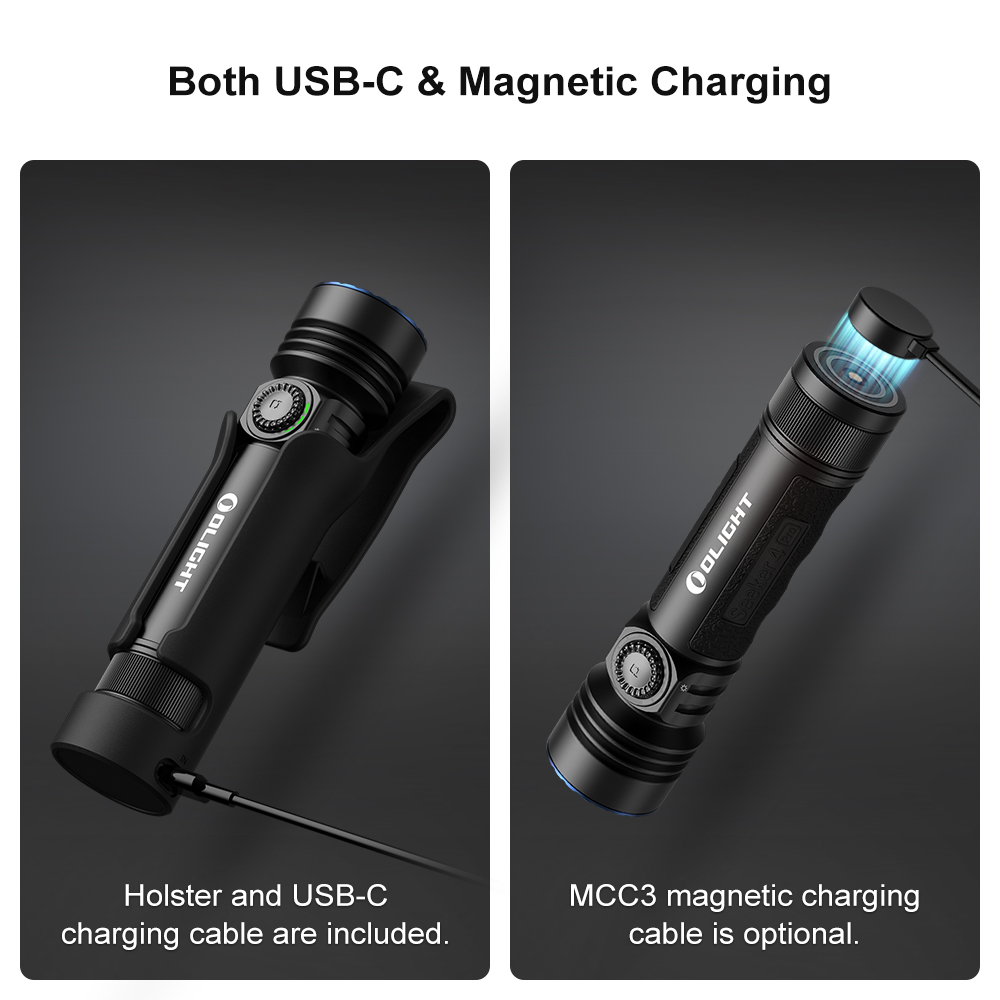
Official Seeker 4 Pro charging comparison. The holster and USB-C cable are identified as included; the MCC3 magnetic cable is optional. The illustration does not establish compatibility with other holsters or charging cables.
At a regular desk, the holster can make sense as a component with a predictable return location. The user brings the light back to its intended arrangement rather than assembling a different system each time. The tradeoff appears when the light moves elsewhere. Decide whether the holster will travel, whether a separate approved magnetic route will be provided, or whether charging will wait until the light returns to the established location.
Do not confuse the charging holster with an independently powered battery case. The documented USB-C route still requires an appropriate external power source. A product being held in an accessory does not establish that the accessory contains stored energy or can replenish the light without a connection. Look for an explicit battery specification before treating any charging accessory as a mobile power reserve.
If the Seeker is borrowed from a household station, make the charging decision before it leaves. Taking only the light may be entirely appropriate when no charging is planned during that use. It is a different decision from expecting to replenish it elsewhere. For the latter, identify and bring the complete approved route rather than assuming that a compatible accessory will already be waiting. The optional magnetic method provides another documented choice, but an accessory that has not been obtained and packed cannot serve as that choice.
The Seeker's larger body, rotary control, and intended carrying arrangement may suit someone who already wants that light for a particular task. In that case, planning around the holster can be a reasonable part of the complete purchase. The accessory becomes an inconvenient extra mainly when it has been omitted from the decision. Compare the light and its required charging route together instead of discovering the dependency after arrival.
Perun 3: keep the specified magnetic cable with the system
Perun 3's manual identifies an MCC3 charging cable in the box. One end serves the light's magnetic charging connection; the other uses a USB-A power-source connection. This is a different equipment requirement from a loose USB-C cable. A bag containing several USB-C leads can still lack the part needed to charge this particular light. Identify the cable by its model designation rather than by magnetic attraction alone.
The benefit of a dedicated cable can be organizational clarity at an established charging location. The owner knows which cable belongs with the Perun and keeps that arrangement ready. The corresponding cost is dependence on that cable when the light is taken elsewhere. If it will be used at several locations, decide whether to carry the approved cable or obtain another correct one, without assuming an unrelated magnetic accessory is a substitute.
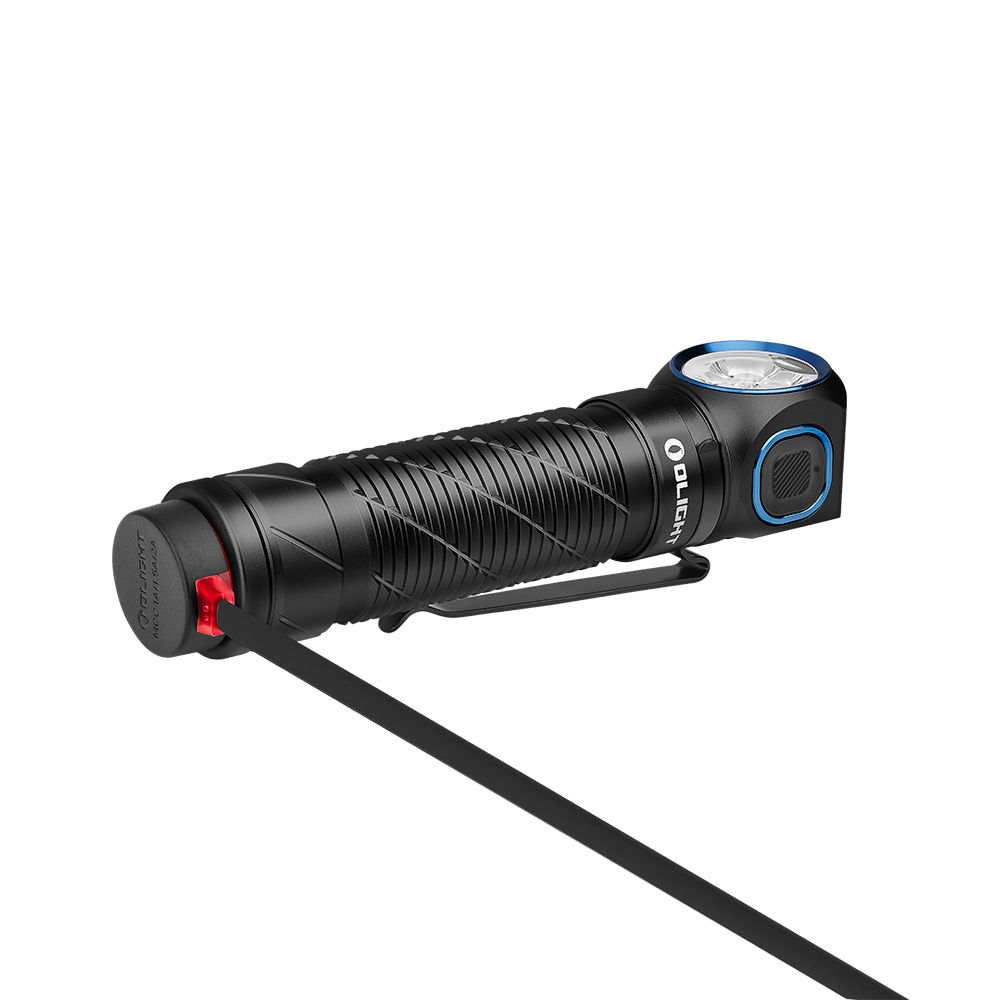
Official Perun 3 magnetic-charging image. The tail connection uses the specified charging cable; the photograph does not show a USB-C port on the light or prove compatibility with every magnetic charger.
Perun 3's right-angle format and supplied headband can make it a useful choice when the actual task calls for that type of light. The charging arrangement should support that choice rather than become an unrelated contest with a compact straight-body flashlight. Someone selecting a hands-free format still needs to account for the cable and power-source connection required when the equipment returns for charging.
The Perun and Seeker manuals both naming MCC3 is meaningful model-specific information. It is a starting point for checking the appropriate replacement or additional accessory, not a rule that every cable carrying an MCC label is interchangeable. Keep the exact light names and Olight's compatibility information with the purchase request. Avoid relying on a photograph of a magnetic head or the fact that two metal surfaces attract.
For a shared household, make the dedicated arrangement easy to identify. Keeping the cable with its intended equipment or labeling its normal storage location can reduce guessing by another adult. The label should record an already verified match, not create one. If a compatibility question remains unresolved, get an exact answer for the light and accessory before buying another cable for the station.
Read both ends of a cable and the component between them
A charging cable has a light-side connection and a source-side connection. An accessory-based route may add another component between the cable and the flashlight. Record all of them when comparing a kit. A note that says only “USB” leaves open which plug the source must provide and whether the cable connects to the light body or a required accessory. Those distinctions determine what has to be packed.
The USB-IF's cable guidance explains that cables have different capabilities and that a certified cable does not add capabilities to the connected products. Apply that distinction narrowly: a familiar connector or a high capability marking on a cable does not change what the flashlight supports. Follow the model's documented charging arrangement instead of assuming that the most elaborate available cable provides a faster or more complete solution.
The Seeker and Perun charging tables describe USB power-source requirements for their specified charging equipment. The Baton battery-information table describes inputs associated with its charging methods. These labels refer to particular components and connection points. Keep the component name with an electrical value instead of copying a voltage from one part of a table and treating it as a requirement for every item in the route.
For example, the Baton table distinguishes a magnetic charging input from its USB-C input. That does not instruct the buyer to find an arbitrary power adapter matching a number taken out of context. Use the exact model's approved cable and the corresponding source requirements. Charging selection should not involve building a cable, bridging contacts, or substituting an unverified electrical arrangement to make two familiar-looking ends meet.
The Baton table lists 4.2 V and 1.5 A for its magnetic charging input, versus 5 V and 1.5 A for USB-C. Perun 3's MCC3 cable table separately identifies a USB-A 5 V, 2 A input and a different output to the light. The component labels explain why values from different ends of a charging route should not be compared as though they were the same socket. These are Olight's published equipment specifications, not instructions to build a power supply or find an adapter by matching an isolated number.
The same approach helps with a desk that offers several sockets. Check the actual available connection and the specified cable, not just the total number of ports. A USB-A-ended magnetic cable and a USB-C-ended lead need different source-side arrangements. Before deciding that one light is simpler for travel, identify which appropriate connection will actually be available at the destination and which parts the user is willing to carry.
Published charging times do not make the kits interchangeable
The Baton 4 Pro manual lists a full-charge time of 3.5 hours through USB-C and 4.5 hours through MCC3. Those entries describe its two charging methods. For someone choosing which arrangement to maintain, the Olight reference can be useful alongside accessory dependence and available connections. It does not establish that every starting battery state or every suitable power source will produce an identical finish time.
Seeker 4 Pro's manual lists about 3.5 hours for its USB-C charging arrangement and about 4.5 hours for the optional magnetic arrangement. The similar figures do not mean that the Baton and Seeker share the same port location or required accessories. The Seeker's USB-C route still depends on its holster. A matching time in two tables is not evidence that a component can be removed from either system.
Perun 3's MCC3 table specifies less than four hours to fully charge. That figure belongs to the Perun's documented system. It is not enough to declare a fastest overall purchase across lights with different batteries, formats, and intended tasks. Keep the exact model, route, and wording attached to each time. A “less than” statement and an “about” statement should not be silently converted into matched measured results.
| Model | Olight charging reference | What remains part of the decision |
|---|---|---|
| Baton 4 Pro | USB-C: 3.5 hours; MCC3: 4.5 hours | Direct body port, actual package contents, suitable cable and source |
| Seeker 4 Pro | USB-C route: about 3.5 hours; optional magnetic route: about 4.5 hours | Holster required for the USB-C route; optional MCC3 is separate |
| Perun 3 | MCC3: less than four hours | Correct dedicated cable and suitable USB-A source |
Charging time is also different from runtime. The time a light takes to replenish its battery does not tell the buyer how long a chosen output mode will remain useful. If a task requires extended operation, read that model's output and runtime table separately. A charging comparison should not turn a convenient interface or a shorter reference charging time into a claim of longer working illumination.
Use the product's documented charging information to establish completion rather than treating a watch as the only signal. Allow enough preparation time before the equipment is needed, especially when the light has been used differently from the previous occasion. A purchase is easier to live with when the complete route fits the routine; it should not depend on repeatedly arriving at the exact end of a catalog charging interval.
Compare five buying situations
For an overnight bag that often moves between locations, begin with the parts the owner wants to carry. Baton 4 Pro's direct USB-C option may be attractive when the existing appropriate cable and source can serve that route. Its body port avoids a separate charging holster for USB-C. Confirm those conditions before describing the arrangement as a one-cable solution; the cable may otherwise belong to another device or lack the required source-side match.
For a light that normally returns to one workspace, a fixed compatible holster or dedicated magnetic cable may be convenient. The required accessory remains in a known place while the light is used nearby. Seeker 4 Pro and Perun 3 illustrate different versions of that arrangement. The choice becomes less convenient when the charging equipment is regularly left behind, so compare the actual movement of the kit rather than assuming a fixed station suits every household.
For someone dividing time between two desks, compare the cost and practicality of duplicated approved equipment with carrying one complete arrangement. This is a different question from whether the light supports a second charging method. An additional compatible cable at the second location might solve the actual problem, while an accessory that never reaches that location does not. Confirm the exact item needed before buying a generic-looking replacement.
For a shared family shelf, clarity can matter more than minimizing the number of visible cables. A dedicated, verified arrangement with its model identity recorded can be easier for several adults to understand than an unlabeled collection of apparently interchangeable accessories. Keep the light, its intended route, and its normal return location connected in that record. This supports ordinary use without inventing a universal charging routine for every model.
For a new buyer, start with the light's intended role as well as the charging location. A compact straight-body light, a larger rotary-controlled light, and a headlamp format are not equivalent simply because the comparison chart contains charging methods for all three. Choosing the right format first prevents the cable decision from overshadowing the task. Then compare the complete equipment needed to maintain that choice.
| Situation | Useful comparison | Question to settle before ordering |
|---|---|---|
| A small bag moves frequently | Direct body port versus required charging accessory | Which parts will actually travel every time? |
| One regular workspace | A fixed holster or correct dedicated cable | Does the light reliably return to that location? |
| Two work locations | Duplicate approved equipment versus a carried kit | Is the exact replacement accessory identified? |
| Several adult users | Clearly matched, labeled arrangements | Can each user identify the light and its charging route? |
| Limited existing power connections | Actual source-side plugs and requirements | Does the intended location provide the appropriate connection? |
Make the purchase note specific enough to use
A useful comparison note names the exact selected light, the charging route to be used, and every required component. Add whether each item is included, already owned, optional, or still unconfirmed. This turns a vague “USB-C versus magnetic” choice into a complete equipment decision. It also makes a later package change visible instead of allowing an old product-family photograph to stand in for the current offer.
Use separate columns for supported, supplied, and already owned. Supported records what the exact model can use. Supplied records the contents of the selected offer. Already owned records equipment that has been checked for that route, rather than a similar item somewhere in a drawer. The distinction is especially useful when changing a color, package, or accessory selection in a shopping cart: the light may still support the same method while the contents of the selected offer require another check.
Put unresolved questions next to the relevant component. If the USB-C lead's inclusion is uncertain, ask about that lead. If a holster is required, ask for the correct compatible holster rather than assuming any holder will charge the light. If the manual names MCC3, include that designation and the exact flashlight when asking about a replacement. Specific questions are easier to answer than a request for any charger that looks similar.
Keep price comparisons at the complete-kit level. A lower lamp-only price does not establish a lower total cost when the intended charging route needs another accessory. Conversely, a bundle with more components has value only if those components are relevant to the buyer's actual routine. Compare the selected offer and necessary equipment without treating every optional accessory as compulsory or every included item as useful for every person.
A rechargeable flashlight comparison should also leave room for a different choice. If the required parts, available connection, or carrying arrangement do not fit the intended use, another appropriate light may be the better purchase. The point of the chart is to expose that mismatch before ordering. It is not a reason to force an inconvenient configuration to work through improvised adapters or unfamiliar electrical parts.
Keep the connection plan within its allowed conditions
The U.S. Fire Administration's battery guidance advises against charging lithium-ion batteries below 32°F or above 105°F and emphasizes following product instructions. Check the exact equipment's conditions as well. A convenient source at a destination does not make that location suitable for charging a cold, overheated, wet, or damaged item. Electrical availability and appropriate charging conditions are separate requirements.
Keep operating-temperature entries separate from charging instructions. A working range describes a particular operating condition; it should not be silently reassigned to another product or every connected accessory. Likewise, a water-resistance label for the light does not establish that a damp cable connection or charging holster can be used safely. These are conditions to resolve before relying on a charging arrangement, not reasons to add an improvised workaround.
If a required part is damaged or the documented arrangement does not behave as expected, use the model and accessory details when contacting support. A buying guide does not supply an undocumented reset, contact-bridging method, battery substitution, or repair procedure. The exact record prepared before purchase remains useful here: it identifies which component and route are involved without guessing from the shape of a connector.
A well-chosen flashlight kit fits both the lighting task and the places where it will be prepared. Direct USB-C, an accessory-based USB-C route, and a dedicated magnetic cable can each make sense under different conditions. The practical choice is the complete, verified arrangement that the owner can keep available, rather than the shortest label or the largest collection of apparently compatible parts.
Frequently asked questions
Changelog
- November 18, 2026: Product information and buying guidance reviewed.