TL;DR: A magnetic phone stand and a compact pocket tool earn their space when they solve a task you repeat: propping up a screen, making a small adjustment, or finding light without rummaging. Choose for your phone case, carry method, and real weekly habits; a combined gadget is useful only when its pieces fit your routine.
A phone kickstand EDC setup is not a gear-counting contest. The best arrangement is the smallest one that keeps a familiar task easy without making another task harder. A magnetic stand can hold a phone at a useful viewing angle, a multitool can combine small implements, and a keychain light can make a dark pocket easier to navigate. Each earns a spot for a different reason.
📋 Table of Contents
- 1. Choose the Carry Setup Around Tasks You Repeat
- 2. Check the Phone and Case Attachment System
- 3. Are magnetic phone stands useful?
- 4. How the Aulumu G05 Pro Combines a Stand and Tools
- 5. Small multitools: useful for the right small job
- 6. What small tools are worth carrying?
- 7. A keychain light solves a different problem
- 8. Does a kickstand add much bulk?
- 9. Pick a combination for a real setting
- 10. Build three sensible carry options
- 11. A compact flashlight belongs in the kit only if it solves a lighting task
- 12. Frequently Asked Questions
- 13. The useful setup is the one that fits the day
Choose the Carry Setup Around Tasks You Repeat
Use this quick matrix to match a repeated task with a carry option and a simple check before you leave.
| Everyday task | Useful configuration | Check before carrying |
|---|---|---|
| Hands-free calls or a recipe on a counter | Magnetic phone stand matched to the phone or case | Confirm the attachment method and the angle you actually use |
| A quick, non-specialist adjustment | Small multitool with the needed tool visibly identified | Keep blades and tools closed until needed; follow local rules |
| Finding a keyhole, bag pocket, or dark step | A rechargeable keychain light | Charge it, confirm how it switches, and return it to the same place |
| Less pocket clutter | One item that replaces an item already carried | Compare the complete carry setup, not just the product footprint |
A neat five-in-one description sounds like a shortcut. A pocket organizer can look like progress too. Neither answers the practical question: what did the separate objects do, and which of those jobs happen often enough to justify carrying the replacement?
Start with a short list of moments from an ordinary week. Maybe the phone is propped up for a video call at lunch. Maybe a screw on a cabinet hinge needs a small turn. Maybe the keys land at the bottom of a tote after sunset. Those are three different jobs, with different tools and different failure modes. A phone stand does not illuminate a pocket. A flashlight does not tighten a screw. A multitool is not automatically the right tool for a repair just because it contains a driver.
The combination works when it reduces the number of separate objects without making the common job slower. It does not work when the clever item stays home because it is awkward, too heavy for the pocket, incompatible with the phone, or inconvenient to use. A single familiar item carried every day can be more useful than a larger kit that is theoretically prepared for everything.
A one-week carry audit that does not pretend to be a study
For seven days, jot down what you reached for, where you were, and whether the task was completed. This is a personal decision aid, not a survey of other people or a performance test. One line per event is enough: “phone stand, video call, desk”; “keychain light, entry lock, sidewalk”; “small driver, loose battery cover.”
At the end of the week, sort the notes into three groups: repeated tasks, occasional conveniences, and items you never used. The first group is the only reliable starting point for a daily carry choice. The occasional items may belong in a bag or desk drawer instead of a pocket. The unused group is a gentle warning that a list of features is not the same as a personal need.
Do not turn one unusual event into a permanent loadout. A forgotten tool can feel essential right after it would have helped. That feeling is understandable, but a single event does not prove you need to carry a bulkier item every day. If a task repeats, adjust the carry. If it does not, keep a backup where the task happens.
Check the Phone and Case Attachment System
Compatibility depends on the magnet arrangement, not on the word “magnetic” alone. A phone designed for MagSafe-style accessories can attach directly when the stand and phone have matching magnetic geometry. A phone without that system may need the included or separately specified adapter ring. A thick, loose, or layered case can change how the phone sits and whether the accessory attaches as intended.
Olight’s U.S. listing for the Aulumu G05 Pro describes compatibility with iPhone 12–17 models and Samsung or Android phones when used with an adapter ring. Treat that as the product listing’s compatibility statement, then check the exact phone and case arrangement you own before relying on it. A phone model family name does not tell you whether a particular case has a built-in magnetic array, a ring, a wallet, or another attachment between the phone and stand.
Before using a new setup, inspect the actual contact surfaces. If your case already includes a magnetic ring, adding another ring may not be the intended configuration. If an adapter ring is required, follow the product’s placement guidance and allow any adhesive to set as directed. A removable case is often the simplest way to compare attachment on the phone itself and on the case. Keep the check gentle and close to a soft surface; there is no reason to test a phone by swinging it over concrete.
The practical compatibility checklist
- Identify the phone model and whether the case supports the intended magnetic system.
- Confirm whether the accessory uses direct magnetic attachment or an adapter ring.
- Check that the case is flat enough for the accessory to sit evenly.
- Open the stand through its normal range while the phone is in hand.
- Try the viewing angle on a stable desk before using it beside a bed, on a tray, or in a moving environment.
- Recheck the attachment after changing the case, adding a wallet, or moving the ring.
A magnetic connection is a means of attachment, not a universal guarantee that every phone-and-case stack will behave alike. A phone with a wallet between it and the stand has a different arrangement from the bare phone. If the product is meant to attach to a ring, the ring’s position matters. If the case maker publishes its own compatibility information, read that alongside the accessory’s instructions.
Are magnetic phone stands useful?
They are useful when a phone is repeatedly propped up for calls, recipes, videos, or reference material and the stand attaches securely to the actual phone-and-case setup. They add little value when the phone is already easy to prop up or the accessory is too bulky to carry. Check the compatibility instructions, then test the angle on a stable surface.
How the Aulumu G05 Pro Combines a Stand and Tools
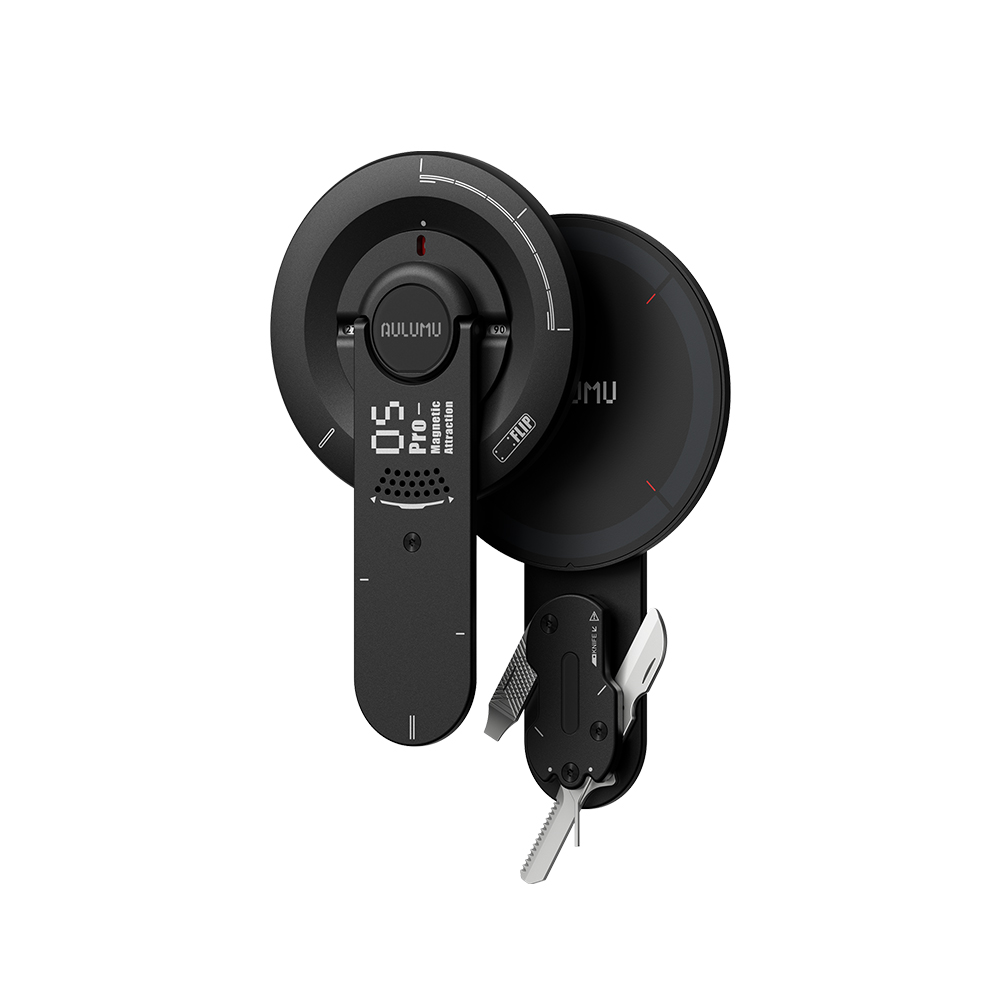
The Aulumu G05 Pro Magnetic Phone Kickstand with EDC Multi-tool is listed on Olight’s U.S. site as a five-in-one accessory: phone stand, grip, fidget spinner, angle measurer, and a small group of emergency tools. Its product description identifies a screwdriver, steel file, saw blade, SIM ejector, and utility knife. The same listing gives dimensions of 95 × 57 × 6.5 mm and a weight of 38 g.
Those details are useful because they make the object easier to compare with the items it might replace. Its card-like footprint can fit a bag organizer or a larger pocket, but “credit-card size” does not mean it disappears into every pocket. At 38 g, it adds weight, and the tool surfaces make it different from a smooth phone ring. The shape, edges, and folded tools deserve a real fit check against the pocket or pouch you plan to use.
The tool list is also a boundary. A small screwdriver can be helpful for a minor adjustment that matches the tool’s design. It should not be treated as a substitute for a correctly sized driver, a repair manual, or a qualified technician. A short saw blade or utility knife may be subject to location rules and should stay closed when not in use. Follow the product directions and applicable rules; do not carry an exposed blade in a place where it is prohibited.
The listed angle measurer can help with a simple angle reference, and the stand can free a hand for viewing. Those are distinct convenience functions. They do not make the product a precision measuring instrument, a secure mount for every surface, or a replacement for a tripod when stable framing matters. Use the feature for the casual task it was designed to support.
Small multitools: useful for the right small job
A pocket multitool is strongest when the task is simple and the tool is designed for it. Tightening a loose screw on a noncritical accessory, opening packaging, or gripping a small object may fit that role. Electrical work, structural repairs, high-torque fasteners, and repairs where a wrong tool can damage a part do not. The scale of a tool matters as much as its feature count.
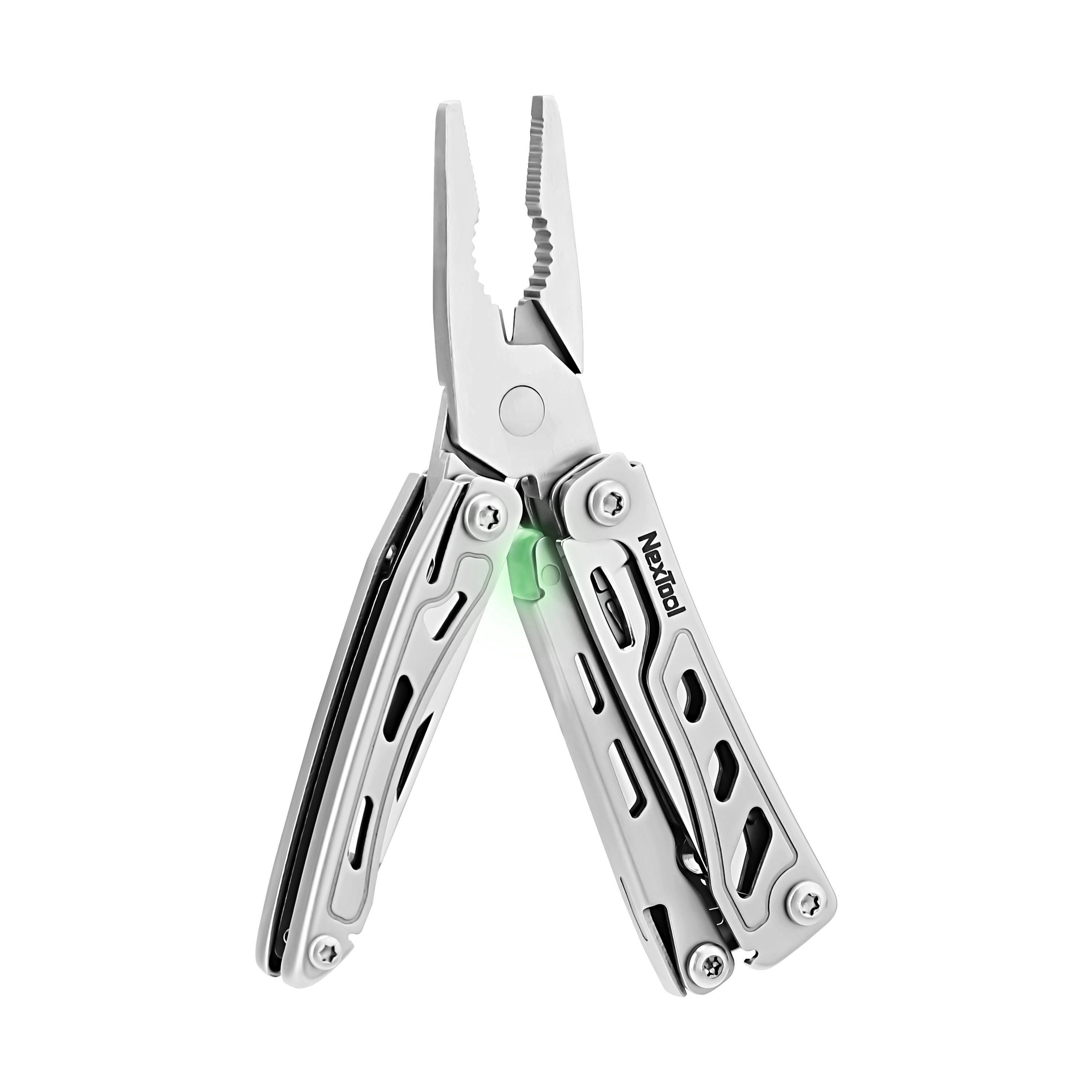
The NexTool Mini Flagship F12 listing identifies a 13-in-1 compact multitool with reinforced pliers, scissors, a locking main blade, and additional tools for cutting, gripping, opening, and quick adjustments. Its listed weight is 79 g. The product page describes a pocket clip and rounded edges. For an everyday setup, those details matter more than a long inventory of implements: how it rides, how it opens, and whether the specific job fits its design.
A multitool can help in a pinch, but it does not make improvised repairs safe. Do not use a small blade as a pry bar. Do not substitute a tiny screwdriver for a correctly sized driver if the fastener is resisting. Do not use pliers near live electrical equipment. If the job requires force, specialized equipment, or knowledge you do not have, pause and use the proper tool or ask a qualified person.
What small tools are worth carrying?
Carry only tools that match recurring, permitted tasks. A small plier or driver can help with a light adjustment when it fits the fastener and the job is not safety-critical. Keep blades closed until needed. Repairs requiring force, precision, electrical training, or specialized equipment call for the proper tool or a qualified person.
A keychain light solves a different problem
A light is not another multitool attachment. It answers a different everyday question: can you see what is in the bag, align a key with a lock, or find the item that slipped under a seat? A keychain light belongs in the combination when those tasks recur and when it is stored where you can reach it without emptying the rest of your pocket.
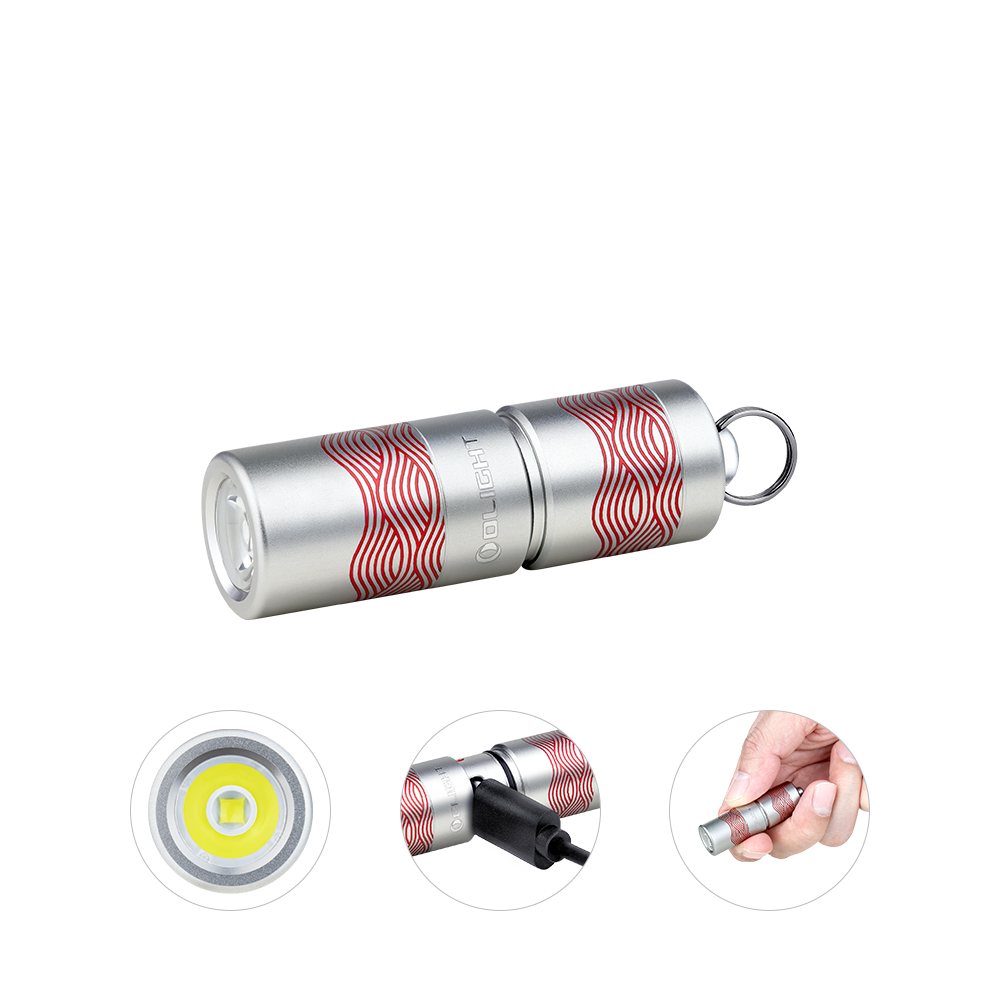
The Olight i1R 2 Pro is listed as a keychain flashlight with a built-in rechargeable lithium-ion battery, USB-A-to-C charging cable, and two output levels: 180 lumens and 5 lumens. The product page gives a weight of 0.78 oz (22 g) including battery, a beam distance of 48 m, 580 candela maximum intensity, and mode-specific runtimes. The manual defines runtime as the time after a full charge until brightness falls to 50% of its initial value, so the listed 12-hour low-mode figure is not 12 hours at constant output.
A simple placement rule can help: keep the light on the key ring or in one consistent pocket, then return it there after use. That matters more than owning several lights that migrate between bags. If you change bags often, give the small light a designated clip or pouch. Before relying on it for a trip, confirm that it charges, turns on, and is easy to operate by touch.
Does a kickstand add much bulk?
It depends on what is already in the pocket. A thin stand replaces nothing if the phone was already easy to prop up and the accessory stays home. A thicker multipurpose item might replace a separate stand and a small tool, but only if its combined shape is comfortable and its features are genuinely used. Compare the full carry, not a single object in isolation.
The Aulumu listing gives the G05 Pro thickness as 6.5 mm and weight as 38 g. That is a concrete starting point for a personal fit test, not a universal judgment about comfort. Put it in the intended pocket with the phone, keys, and wallet you normally carry. Sit, stand, and walk as you usually would. If the item presses into the phone, catches on fabric, or changes how the pocket opens, the nominal thickness may not tell the whole story.
Try the same check with the complete phone setup. A case and adapter ring can change the total profile. A wallet attached to the phone can compete for the same magnetic surface. A stand mounted to the back of a phone may be convenient at a table and annoying in a tight pocket. There is no single best position for every case, garment, or desk.
A simple bulk comparison
Compare the setup by what it replaces, what remains separate, and how easy each item is to reach.
| Setup | What it can replace | What remains separate | Best question to ask |
|---|---|---|---|
| Stand only | A separate phone prop | Any tool and light | Will the stand remain on the phone every day? |
| Stand plus small multitool | A stand and selected small tools | A light and specialized tools | Do the included implements match repeated light-duty tasks? |
| Stand, multitool, and keychain light | Several small items | Larger repair tools and other task-specific gear | Is each item easy to reach and return to its place? |
A combination can reduce the number of loose objects yet make the one combined object harder to access. That tradeoff is common with keys, wallets, and pocket organizers. A dedicated single-purpose item may be faster if you use it constantly. Multipurpose gear is a practical choice when it fits the way you already move through a day.
Pick a combination for a real setting
Desk, kitchen counter, or shared workspace
A phone stand is the clear lead when the phone is used for video calls, recipes, timers, or reference material. Put it on a stable, level surface and keep the screen within easy reach. A small tool belongs in a drawer or bag if occasional adjustments are part of the routine. A keychain light can help inspect a bag or cabinet, but it does not need to sit beside the phone if you never use it there.
Keep loose items away from spills and hot surfaces. A multitool should not be left open on a shared desk. If the stand includes a blade or small tool, close and store it after the job. The most useful desk setup often separates the phone prop from the tool rather than attaching every object to the phone.
Commuting and errands
An everyday setup should be quick to put away. A magnetic stand may help on a stable desk during a break, while a keychain light may help locate items in a dim bag. A multitool is only appropriate if its tools are permitted where you travel and where you use them. Rules vary by venue and jurisdiction, so check requirements instead of assuming that an item allowed at home is allowed everywhere.
For a train or bus, think about where each item goes before boarding. A stand fixed to the phone can be handy at a seat but may make the phone bulkier in a pocket. A clipped multitool should not swing loose or snag nearby items. A keychain light can stay attached to the keys. The goal is predictable storage, not a dramatic gadget reveal.
Travel and an overnight bag
Travel adds restrictions and different routines. Before packing any blade or multitool, check the current rules for your carrier, destination, and facility. Do not rely on a generic “EDC legal” label to cover every trip. If you do not need the tool at the destination, leave it out. A phone stand without cutting implements may be more convenient for a hotel desk, but verify that it attaches to your case as intended.
A rechargeable keychain light is easiest to manage when it has a consistent place in the bag and a known charging routine. The i1R 2 Pro uses USB-A-to-C charging according to its listing; identify the cable and a suitable power source before you leave. The light’s listed 12-hour low-mode runtime is a manufacturer figure for that mode, not a promise that a neglected or uncharged light will be ready months later.
Around the house
A compact light can help find dropped hardware or see inside a closet. A small tool may assist with an appropriate noncritical adjustment. A phone stand can hold a screen for a timer or call. Keep these uses separate from jobs that require a qualified repair person. A tiny multitool is not a substitute for an insulated tool, a torque specification, or a safe work procedure.
Store a multitool folded and out of reach of children. Keep blades closed and use a stable work surface. If an object is damaged, hot, connected to electricity, under tension, or part of a safety-critical assembly, do not improvise with pocket tools. The useful skill is recognizing the limit as clearly as the tool.
Build three sensible carry options
| Carry option | What goes with you | Why it works | When to leave something out |
|---|---|---|---|
| Phone-first | Phone stand matched to the phone/case | Good for frequent hands-free viewing | Leave the multitool out if you rarely need its implements |
| Pocket-tool first | Compact multitool plus a consistent storage spot | Covers selected light-duty adjustments | Leave it home where blades or tools are restricted |
| Small-light backup | Keychain light with the keys | Keeps close-range illumination easy to locate | Do not count on it if it is uncharged or buried in a bag |
These are not bundles that everyone needs. Pick one starting point, carry it for a week, and write down what you actually used. If an item creates friction, change the placement before adding another gadget. If it still stays unused, move it to a bag, drawer, or home kit. A quieter pocket is useful only when the setup remains ready for the tasks that matter.
A five-minute reset at the end of the day
Return each item to its assigned location. Close the multitool and check that no implement is partly open. If the keychain light was used for a longer task, recharge it according to its manual rather than waiting until the next time it is needed. Check the phone stand and case after changes; a new case, ring, or wallet may alter the attachment setup.
This is not a maintenance ritual that needs special equipment. It is a small habit that keeps the carry predictable. A light that stays on the keys is easier to find than a light that moves between coat pockets. A tool stored closed is safer to handle than one dropped loose into a bag. A stand that is returned to the phone is more useful than one left on a table at work.
A compact flashlight belongs in the kit only if it solves a lighting task
There is a reason to keep a compact flashlight separate from a stand or multitool: each has a different job. A phone screen is not a dependable substitute for a dedicated light when the screen must remain visible or the phone needs to stay in use. A multitool light, if present on another product, may not offer the control or runtime you want. The i1R 2 Pro keeps the lighting task in a dedicated keychain form.
If you already carry a phone and a separate compact flashlight, choose the arrangement that is easiest to retrieve without opening every compartment. If a small light is not part of your routine, do not add one just to complete a list. Readers comparing other formats can browse Olight’s rechargeable flashlight range. A practical carry kit is personal and can remain very small.
If you also want a separate light for everyday carry, Olight’s Best EDC Flashlights 2026 guide compares pocket-light formats. For a phone stand, the important question is where the phone rests and whether the angle is useful. For the multitool, the question is which implement fits the task and whether you are allowed to use it there. For a light, the question is whether it is charged and accessible. Treating each object by its job makes the setup easier to explain and maintain.
Frequently Asked Questions
The useful setup is the one that fits the day
A phone stand, a small tool, and a keychain light can work together, but they do not become one perfect object simply because they fit on a product page. The stand supports hands-free viewing. The multitool handles selected small jobs. The light helps you see nearby objects when the room, bag, or entryway is dim. Their value comes from the task, not the count of features.
Begin with the objects you already reach for. Confirm the phone and case compatibility before choosing a magnetic accessory. Keep blades and tools closed when carried, and leave specialized repairs to the correct equipment and qualified people. Give the light a consistent home and charge it before a planned outing. Then reassess after a week. If the setup makes everyday tasks easier without creating new friction, keep it. If not, simplify.
Changelog
- November 19, 2026: Verified current Olight U.S. product specifications and image sources for the Aulumu G05 Pro, NexTool Mini Flagship F12, and i1R 2 Pro; prepared the phone-stand and pocket-tool guide from those product records.