TL;DR: Check Olight product questions against the exact model, approved charging equipment, operating manual, and applicable United States policy. Charging convenience, battery compatibility, working output, and service coverage answer different needs. Identify the question first, then use the relevant document to decide what fits the task or what information support needs.
📋 Table of Contents
- 1. Start with the exact product and the question
- 2. Why do some people dislike proprietary charging?
- 3. Baton 4 Pro makes the charging question concrete
- 4. Are Olight batteries replaceable?
- 5. Read brightness and runtime as a complete entry
- 6. Warrior 3S shows why the control configuration matters
- 7. Keep operating features separate from storage habits
- 8. What happened with the recall?
- 9. Warranty coverage depends on the product and the issue
- 10. A return and a service request solve different problems
- 11. Price and promotions need an exact purchase comparison
- 12. Work through the complete ownership routine
- 13. Ask about replacement support with a specific part in mind
- 14. Prepare a question that can lead to a clear answer
- 15. Frequently Asked Questions
Start with the exact product and the question
A concern about a flashlight becomes easier to resolve when it names the model and the task. A light that is awkward to recharge during travel raises a different question from a light whose working setting does not suit a nearby label. Write down what you need the product to do before treating an unfamiliar feature as a fault or assuming that another model behaves the same way.
Separate product behavior from the purchase arrangement. The manual explains controls and approved equipment. A package list identifies what is supplied. A warranty or return policy addresses a particular kind of request. Those documents can work together, but one does not replace the others. This distinction helps an owner find a useful answer without turning every concern into a general judgment about the entire product range.
| Question to resolve | Start with this evidence | A practical next step |
|---|---|---|
| The available cable does not match the light | Exact charging instructions and package list | Identify the approved connection and required equipment |
| A replacement battery appears to fit | Model-specific battery information | Confirm the exact approved replacement before buying |
| Maximum output does not continue indefinitely | Complete output and runtime table | Read the stages and choose a suitable working level |
| A control behaves differently from expected | Starting state and configuration instructions | Check the active arrangement before repeating the action |
| The product does not fit the purchase need | Applicable return conditions and order information | Identify the relevant seller and request process promptly |
Keep the distinction between a preference and a functional concern. A larger body than expected may be an unsuitable carry choice. An absent item may be a package discrepancy. An operating behavior may be explained by the selected configuration. None of those possibilities should be assumed without checking the actual model and the information that came with the purchase.
A useful question contains enough context for someone else to understand the situation. Identify the product, the intended task, the equipment being used, and what happened. Describe an observation plainly rather than assigning an internal cause. A precise account helps an owner consult the correct instructions and gives support a better starting point when the published information does not resolve the issue.
Why do some people dislike proprietary charging?
A model-specific charging connection can be inconvenient when its approved cable is unavailable, forgotten, or difficult to replace during a trip. The concern is about maintaining the complete charging arrangement. A magnetic connection may be convenient at a regular desk, while another connection may fit the equipment already packed for travel. The useful choice depends on the actual routine and the exact model's instructions.
Begin by separating the connection on the light from the power source supplying the cable. A cable can connect to a familiar USB source while using a different connection at the flashlight. Calling the arrangement USB charging does not establish that the light has a USB-C socket. Identify both ends of the intended setup before deciding which equipment can be shared or left at a regular charging location.
For travel, list the approved items that must arrive together: light, appropriate cable, and suitable power source. Then consider where each item will be stored and what happens if it is left behind. This is more useful than deciding that every specialized connection is either always convenient or always unsuitable. A good home arrangement and a good travel arrangement can place different demands on the same product.
The guide to magnetic flashlight charging and USB-C explores those arrangements in more detail. Use it to organize the comparison, then return to the exact manual and package being considered. A general explanation of connectors should not become permission to use equipment that the specific product does not approve.
Baton 4 Pro makes the charging question concrete
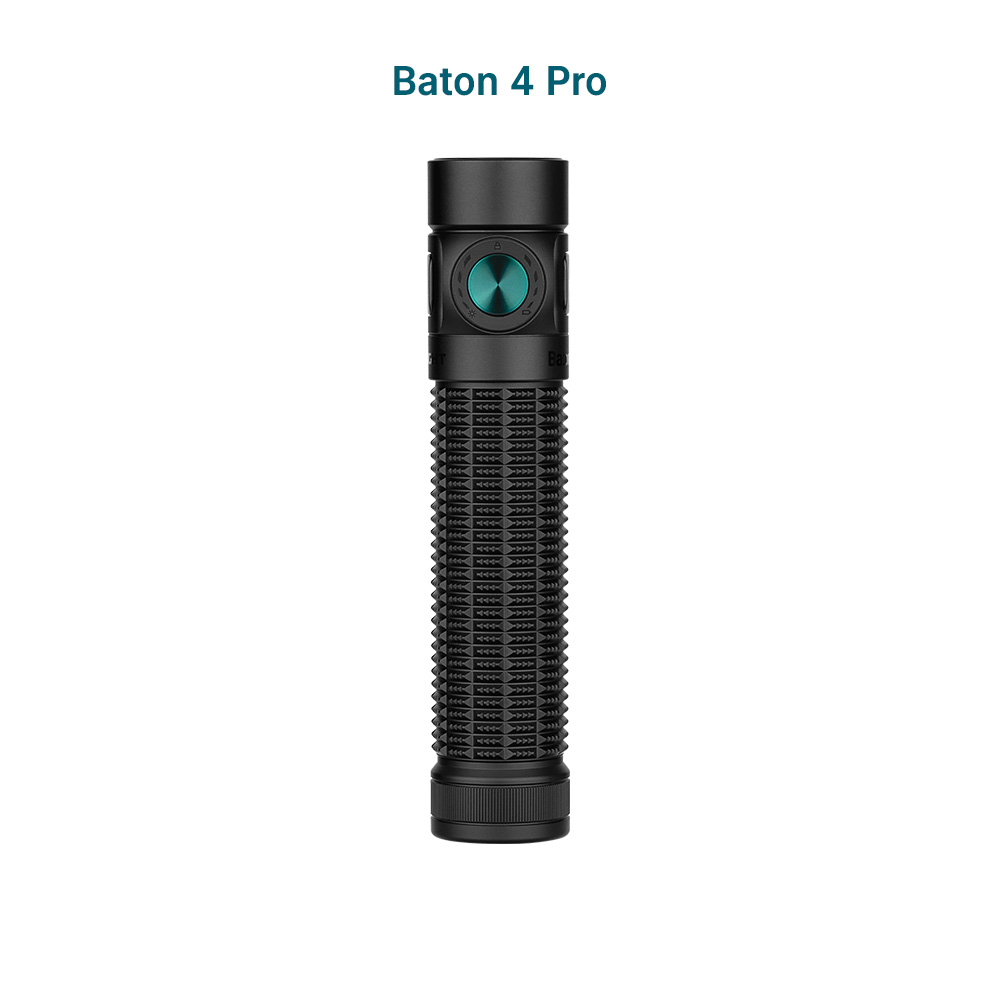
The standard Baton 4 Pro measures 111 millimeters long and 23 millimeters in diameter. These dimensions give a useful starting point for a pocket or small organizer. Compare them with the actual storage space and the other belongings normally carried there. A complete product photograph shows the shape and control locations, but it cannot establish how comfortable the body will feel in every hand or pocket.
Its USB-C port is concealed beneath a rotating tailcap ring, while magnetic charging provides another connection. An owner can therefore investigate two practical arrangements rather than assuming a single charging routine. Confirm the required cable, supply, and package contents before choosing. Two available connections do not mean that every charger or cable already in a drawer is appropriate for the product.
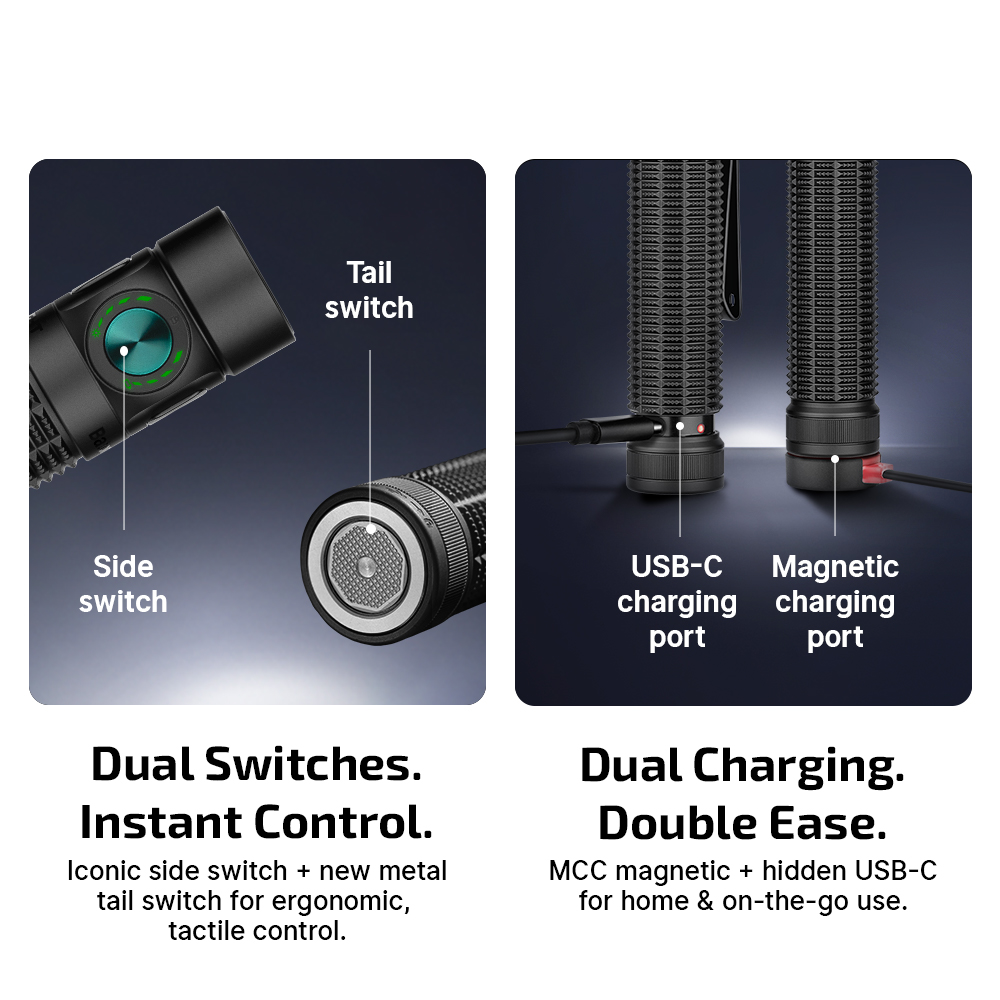
Official Baton 4 Pro detail: the controls and charging points have different jobs, so locate the actual connection before using the light.
For a regular home location, a compatible magnetic cable can be kept where the light returns after use. For a journey, the USB-C option creates a different equipment question. The owner still needs an appropriate supply and cable. Plan the arrangement around what will actually be available rather than the connector name alone, and follow the product's instructions for preparing and using either charging connection.
Are Olight batteries replaceable?
Battery arrangements vary by model. The useful question is whether the exact light has a user-replaceable battery, what replacement is approved, and how the instructions describe replacement. A familiar size label or a cell that appears to fit does not establish compatibility. Check the model-specific information before buying a spare or assuming that a battery from another flashlight can be substituted.
The designation of a cell is only part of the answer. An approved replacement may have particular electrical or physical requirements beyond its general size category. A product's charging arrangement also matters. Keep the battery and charging questions connected to the exact design, rather than treating all lights using a familiar designation as interchangeable collections of parts.
For example, the standard Baton 4 Pro uses a rechargeable 18650 battery. That fact identifies its general battery format; it is not approval for every battery bearing that label. An owner considering a spare should use the specified replacement information. The same approach applies when comparing a light with a different battery arrangement or deciding whether existing charging equipment belongs in the plan.
The overview of flashlight battery types helps explain the broader categories. Use that background to ask a more precise model question. If the correct replacement cannot be established from the instructions or official product information, obtain clarification from Olight rather than modifying a cell or light to make an uncertain combination fit.
Read brightness and runtime as a complete entry
A maximum output figure describes one operating condition. It does not establish how the light will behave throughout a longer task. Find the complete mode and runtime information for the exact configuration. Where the manual lists an initial output followed by later stages, keep the stages in sequence. The later working output may matter more than the brief peak for reading labels or checking equipment over an extended period.
The standard cool-white Baton 4 Pro manual provides a specific example: Turbo is listed at 1,600 lumens followed by 600 lumens, with corresponding stages of two minutes and 198 minutes under the stated conditions. The entry should be read as a sequence. Assigning the combined duration to the initial maximum would give the owner an expectation that the listed information does not support.
Choose the task's working level before comparing endurance. Reading a nearby reflective surface and briefly looking farther along a dark route create different needs. A lower setting can be more appropriate for the nearby task, while a stronger setting may be useful for a brief check. The question is which documented setting lets the owner see what is needed, not which number looks most impressive in isolation.
When comparing rechargeable flashlight options, keep battery condition, output setting, and charging routine in the decision. A long duration at a lower level is useful information, but it cannot be attached to another setting. Published conditions explain what a runtime entry means; they do not calculate a personalized duration for every intermittent pattern of use.
Warrior 3S shows why the control configuration matters
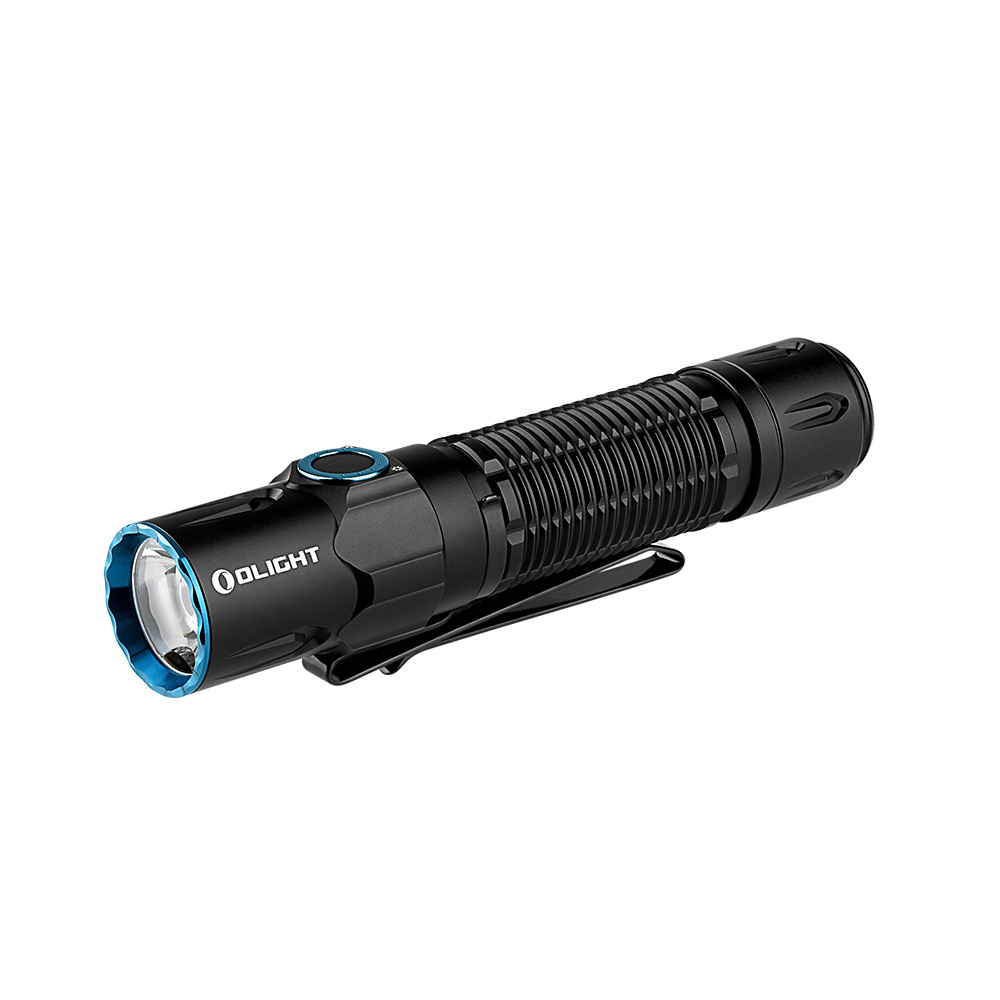
With the flashlight off and the factory-default tail-switch configuration selected, a half press selects Medium and a hard press selects Turbo. The manual distinguishes a quick press and release for on or off from holding the tail switch for momentary light. The starting state and configuration belong with that explanation. A short description that omits them can create confusion even when it names the correct button.
Separate brightness and battery indicators answer different questions. One concerns the operating level; the other reports battery status. Learn which indication is being read before treating an illuminated symbol as evidence of a particular remaining duration. Useful status feedback depends on understanding its meaning, rather than simply recognizing that an indicator is present beside the control.
For a light shared within a household, explain the ordinary working control and identify the active configuration. A person familiar with another model may expect a different response to a similar button. A brief explanation with the light directed at a suitable clear surface can make the handoff more useful than relying on the user's memory of another product's operating sequence.
Keep operating features separate from storage habits
A protective feature has a defined function and conditions under which it operates. Warrior 3S has a proximity sensor that reduces brightness when an obstruction is detected under the specified higher-output conditions. Read those limits in the exact manual. The feature should not be treated as permission to leave an operating lamp pressed against fabric or to ignore the product's storage instructions.
Before placing a light in a pocket, bag, or organizer, follow its actual off and lockout instructions. Lockout behavior can differ between models, so a remembered sequence from another light should not be assumed to apply. Keep loose objects from bearing on controls and choose a storage arrangement that follows the manual. These are ordinary ownership questions that deserve attention alongside output and charging.
Consider the whole routine when selecting an edc flashlight. Where will it sit among keys and other belongings? Which control will be used for a nearby check? Where will it return for charging? A product can offer an attractive feature yet remain inconvenient if its carrying and replenishment needs do not fit the owner's day.
What happened with the recall?
The March 9, 2022 U.S. Consumer Product Safety Commission notice concerns M2R Pro and Warrior Mini flashlights. It describes inadvertent activation and overheating in a holster or pocket, creating a burn hazard. The notice instructs consumers to stop using recalled lights immediately and contact Olight for the stated remedy: a full refund in store credit or a free replacement flashlight.
Match the exact model markings with the official notice and follow its instructions. A similar product-family name does not settle whether a particular unit is covered. If the identity of an inherited or secondhand light is uncertain, preserve photographs of its markings and ask Olight to help identify it. Use the published contact route for the recall rather than guessing from an unrelated product listing.
Keep that notice associated with the affected unit. A general recommendation, a seller's description, or an owner's preferred storage routine does not replace the recall instructions. The practical next step for a matching product is the official remedy process, rather than an improvised repair or a conclusion drawn from the appearance of a different flashlight.
Warranty coverage depends on the product and the issue
The current Olight United States warranty and return policy includes purchase-eligibility conditions and distinguishes covered normal-use defects from ordinary battery aging, misuse, loss, and cosmetic wear. Its component table treats charging cables and carrying accessories separately. Read the terms that apply to the exact purchase and component instead of extending a lifetime label to every situation.
Describe the concern before deciding what kind of request to make. A light that no longer charges as expected, a missing package item, and a preferred size change are different questions. A clear account identifies what was expected and what was observed. It gives the owner and support a better basis for finding the relevant instructions or purchase information without assuming the cause of an issue.
The published service process requests information including the model, serial number, issue description, and supporting photos or video. The guide to flashlight warranty coverage offers further context. Keep service coverage separate from a seller's additional promises, and use the current written terms when a particular purchase or component needs clarification.
A return and a service request solve different problems
The published U.S. policy describes a return window of 30 days from receipt, with unused products in original packaging and promotional items returned together for a full refund. It directs third-party return or refund requests to the original seller first. Check the current conditions promptly when a purchase does not meet the intended need.
A carry preference may become apparent before the owner has learned every control. Compare the body with the intended pocket or organizer and review the instructions early. If returning the product is the desired outcome, identify the applicable seller and written process before assuming that continued use is compatible with those conditions. A warranty and a preference return should not be treated as the same arrangement.
Price and promotions need an exact purchase comparison
Compare the actual package and final offer rather than a headline price alone. Check the model, configuration, included equipment, and any conditions shown for the purchase. A low item price can be less informative when the buyer still needs a compatible cable or another required component. The useful comparison concerns the complete arrangement needed for the intended task.
An offer on one configuration does not establish the price of another finish, bundle, or model. Keep the exact item description with the order information. If the offer is unclear, ask for clarification before purchasing rather than inferring what will arrive from a similar photograph. This approach addresses a purchase question directly without requiring a claim about a brand's general pricing or promotional habits.
Set the requirement before considering the extra feature. For a light kept near the front door, straightforward operation and a maintainable charging location may matter most. For a light carried between work and home, compatible equipment at both locations may matter more. A useful purchase reason explains the fit with that routine, including the equipment the owner will actually keep available.
Work through the complete ownership routine
Consider an owner choosing a light for nearby household labels and occasional evening checks outside. The first decision concerns a suitable working setting, not a charging accessory. The next concerns where the light will be kept and replenished. Only then does the owner need to decide which approved cable and supply belong in that location. Treating the purchase as a connected routine makes it easier to identify the feature that solves the actual inconvenience.
For a light that travels between home and another location, decide whether compatible equipment will stay at both ends or travel with the light. A forgotten cable can interrupt the routine even when the battery and flashlight are functioning as designed. Record the equipment that each arrangement requires. If a second compatible cable is part of the plan, confirm its exact identity and availability rather than assuming a general connector description is enough to order one.
For a shared household light, include the next user in the decision. A control arrangement that one person already understands may be unfamiliar to someone borrowing it. Show the ordinary working action, identify the relevant indication, and explain how the product should be put away. This can reveal an operating preference before it becomes a repeated source of confusion. It also gives the household a clearer basis for choosing between a simpler routine and additional selectable actions.
A practical purchase reason can then be written plainly: the body fits the intended pocket, the documented working setting suits the nearby task, and the approved charging arrangement fits the place where the light returns. Keep any remaining condition with that reason, such as learning a particular switch configuration. This is more useful than deciding from a single attractive specification and trying to create the supporting routine after the package arrives.
Ask about replacement support with a specific part in mind
A question about long-term ownership should identify the part and the exact model. A replacement battery, a charging cable, and a carrying accessory are different requests. Keep the model name and any official part information together before asking about availability. A general question about whether an entire range is supported may not give the person answering enough information to identify the item that would actually resolve the owner's concern.
Current availability and future availability are also different questions. A visible product page can help identify a component or its compatibility, while a particular purchase still depends on the current offer. It should not be converted into a promise that every accessory will remain available indefinitely. If continued access to a particular item is important to the intended use, raise that requirement directly and keep the answer connected to the named part and the date of the inquiry.
For an older or secondhand light, preserve the complete model markings rather than relying on a similar finish or body shape. Compare that identity with the available official instructions, then ask which equipment applies to it. A newer light with a familiar name may use a different arrangement. An accurate identification can remain useful even when the eventual decision is to retain the older product for a different role or choose another model for the main task.
Prepare a question that can lead to a clear answer
Write down the exact model, the task, and the observed behavior in plain language. If the question concerns charging, identify the cable and power arrangement. If it concerns a control, describe the starting state and the action used. Keep an observation separate from a suspected explanation. A report that identifies what happened is easier to assess than a general statement that the product is unreliable.
Keep relevant purchase information and the correct manual accessible. A photo of the complete light and its readable model markings can help when a product has been shared or inherited. For a package question, preserve the item description and list what arrived. These details turn a broad concern into a specific issue that can be compared with the applicable product or purchase document.
Use the response to decide the next appropriate step. It may clarify a control action, identify approved equipment, explain which purchase terms apply, or direct a covered unit to the recall process. Avoid treating an answer about one model or transaction as a new promise for the entire range. A useful resolution remains connected to the original product and the question the owner needed answered.
Frequently Asked Questions
Changelog
- November 19, 2026: Product information and buying guidance reviewed.