⚡ TL;DR
Olight classic products can remain useful when their size, controls, and power source fit a job you still do. A newer feature matters when it removes a real inconvenience. Start with the task, then compare the exact model, its working settings, and the equipment needed to keep it ready.
📋 Table of Contents
- 1. Match Olight classic products to the task
- 2. i3E EOS: a compact light with one clear purpose
- 3. iUltra: convenience can come from a different power routine
- 4. Baton 4 Pro: choose adjustments when the task needs them
- 5. Compare functions without inventing a successor story
- 6. Keep power and support separate from model age
- 7. Recognize the point when an upgrade solves a real problem
- 8. Check how the light fits the things you carry
- 9. Evaluate an older listing by its exact identity
- 10. Choose the role before choosing the model
- 11. Frequently Asked Questions
Match Olight classic products to the task
A familiar flashlight can be easy to overlook beside a longer feature list. The Olight classic products hub is a useful starting point, but each model and configuration still deserves a closer look. You may only need to find the right key, check a bag pocket, or read a label in a dim closet. The buying problem is deciding which changes would improve those moments enough to justify a different light. A model's age alone cannot answer that question.
Use “classic” as a description of a familiar design, rather than a performance rating. It does not promise that every earlier version remains available, that all finishes share the same specifications, or that a current model will stay in production indefinitely. Compare the actual product offered now with the job you want it to do. Separate its useful simplicity from nostalgia about an older purchase.
| Your recurring need | Feature to examine | Tradeoff to accept |
|---|---|---|
| Brief light with the house keys | Compact body and straightforward activation | A small keychain light may offer little brightness adjustment |
| Replenishment without a dedicated cable | Exact battery requirement or built-in charging plug | Replacement cells and charging access create different routines |
| Longer everyday tasks | Useful lower settings and comfortable carrying | A larger light occupies more pocket space |
| Shared household equipment | Controls another adult understands | More modes can require more explanation |
Write down the last occasion when your light caused trouble. Perhaps it was absent because you left it charging, too bright against a nearby glossy label, or awkward to hold with your keys. Each complaint suggests a different purchase criterion. “I want something newer” is much less useful than “I need a lower setting for close reading” or “I need a charging method I can use at my desk.”
A flashlight earns its place when you carry it, recognize its controls, and can maintain its power supply. Consider those habits alongside output. The best specification on a page cannot help if the light routinely stays in a drawer because it is inconvenient to carry. Equally, familiar handling cannot make an undersized light suitable for a longer or more demanding task.
i3E EOS: a compact light with one clear purpose
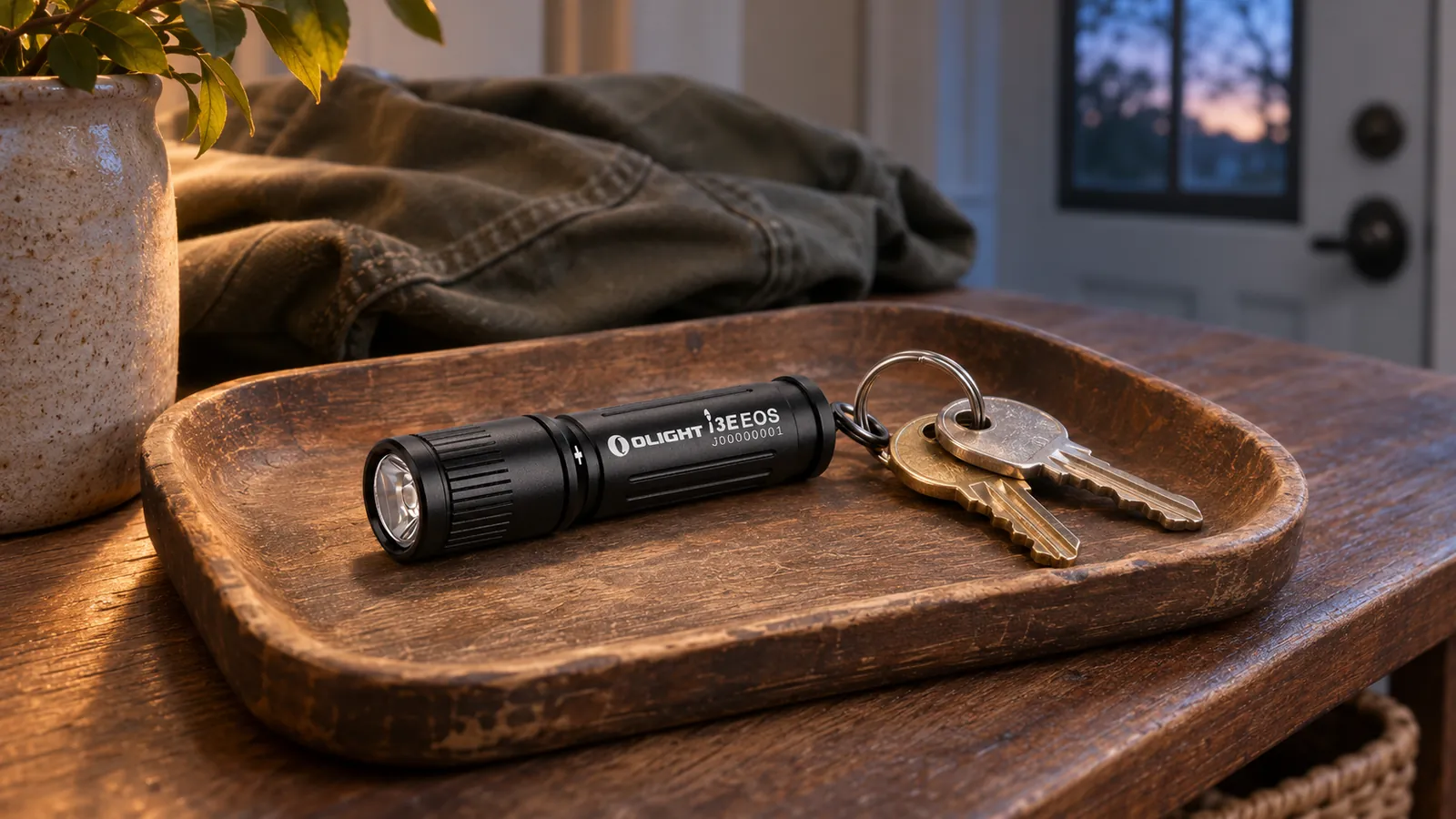
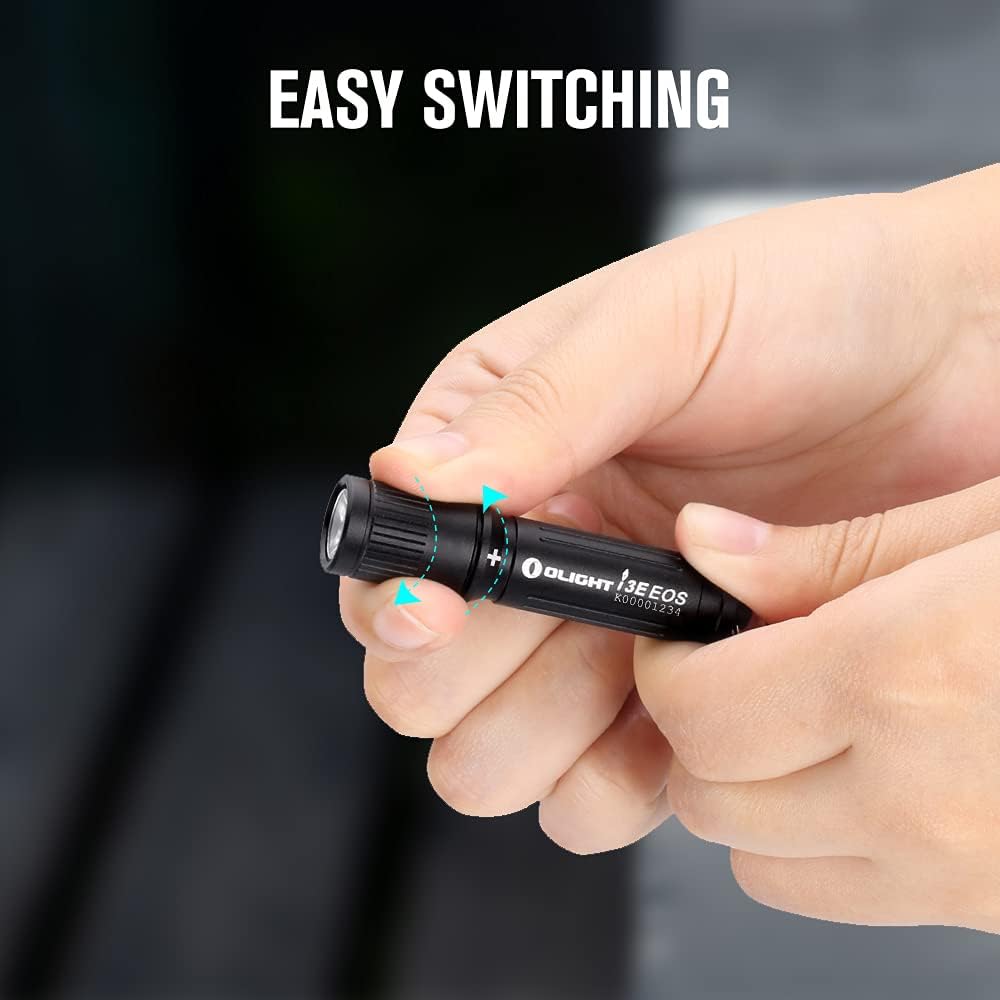
The Olight i3E EOS, in Black, uses a single AAA battery and a head-twist control. Olight describes activation at 90 lumens and lists a length of 2.38 inches. Those features explain its appeal for a straightforward keychain role: a small item stays with something you already carry, and the ordinary lighting task does not require choosing among several brightness modes.
Imagine arriving at an unfamiliar doorway while holding a bag. Your immediate need is identifying the key and lock, not lighting the entire approach for an extended period. A compact light can help with that close task if it is within reach. Think through where the keys are, how you will set down the bag, and whether you have the hand access needed for a twist control.
Simple activation still involves a physical action. If you struggle to grasp a small cylindrical head, wear gloves for the task, or need to operate a light while one hand remains occupied, examine the control before choosing by size alone. The photograph shows the relevant surfaces. It does not establish that every person can operate the light comfortably in every grip or that a crowded keyring will stay out of the way.
The single-output design also has a clear limitation. A person who wants a very low setting for a nearby page should choose a model with an appropriate documented setting. Changing the beam's angle can reduce a reflection, but it does not create an extra brightness level. Avoid buying a simple light for its lack of mode selection and then expecting it to offer the adjustments of a larger everyday light.
A replaceable AAA supply can suit someone who prefers maintaining compatible spare cells to finding a charging connection for the light itself. Follow the exact model's battery instructions rather than treating “AAA” as permission for any chemistry or voltage in a similar wrapper. Keep the cell identification with the equipment record. The practical advantage is a power routine you can actually maintain, not a guarantee that any battery in a household drawer is suitable.
iUltra: convenience can come from a different power routine
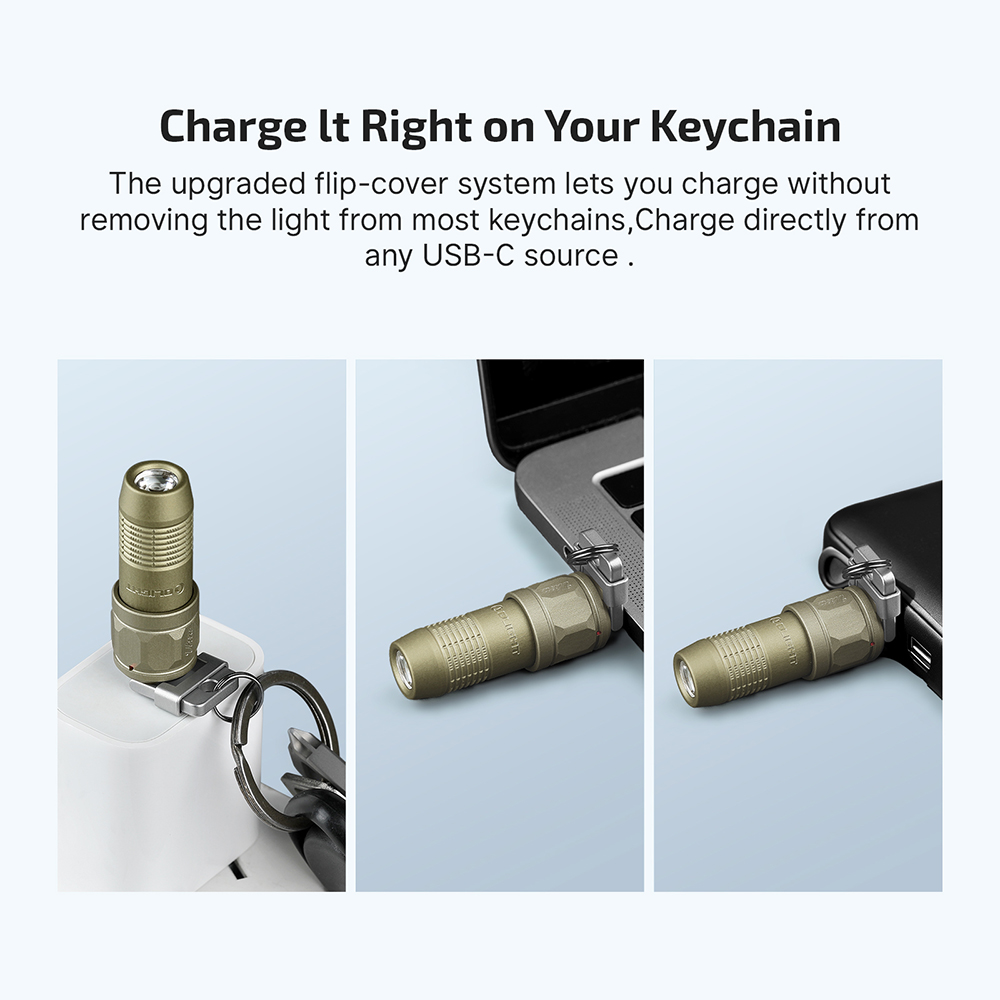
The Olight iUltra, in its Olive Green configuration, offers 80 lumens, a built-in USB-C plug, and pull-to-activate operation. Olight describes detaching the light from its magnetic base to turn it on and attaching it again to turn it off. This is a different control and replenishment arrangement from the i3E EOS, rather than evidence that one is a direct successor to the other.
The integrated plug addresses a common small-light inconvenience: remembering a separate charging cable. If you regularly have access to a compatible USB-C power source, the light can fit that routine. The flip-cover design allows charging without removing it from most keychains, according to Olight's product imagery. The useful question is whether your particular keys and charging location leave enough clear space for that arrangement.
Look at the available space around a laptop or power bank port before assuming that a plug will be convenient there. A recessed socket, surrounding connectors, or a heavy bunch of keys can make the position awkward. Support the equipment sensibly and follow the charging instructions. Built-in charging changes what you need to remember; it does not remove the need for suitable power or careful handling of the connection.
Pull activation may appeal to someone who prefers separating the light from a base to finding a small switch. The base then becomes part of the equipment you must keep together. Think about where the light will rest while it is on and how you will reconnect it afterward. A different activation method is valuable when it suits your hands and routine, not merely because it is different from a twist head.
Olight also lists a magnetic base for attachment to suitable metal surfaces. That can free a hand for an ordinary nearby task when the surface holds the light securely and points it in a useful direction. Check stability before relying on the attachment. A magnetic base does not make wood magnetic, secure the light to every metal surface, or turn an unsuitable location into a safe work position.
Notice the distinction between a built-in USB-C plug and a USB-C socket that accepts a cable. The iUltra plug connects directly to a suitable source, so it occupies space next to that source while charging. A light with a socket can sit farther away on a compatible cable. If your available outlet is crowded or difficult to reach, that difference can matter more than the broad description “USB-C rechargeable.”
The OAL aluminum housing adds another consideration for keys carried beside other hard objects. Olight describes the material as durable and scratch-resistant. Treat that as a housing characteristic, not a promise that the entire light cannot be damaged. The charging plug, lens, attachment arrangement, and power condition still deserve attention. Material choice should support your actual carry pattern rather than replace ordinary care.
Baton 4 Pro: choose adjustments when the task needs them
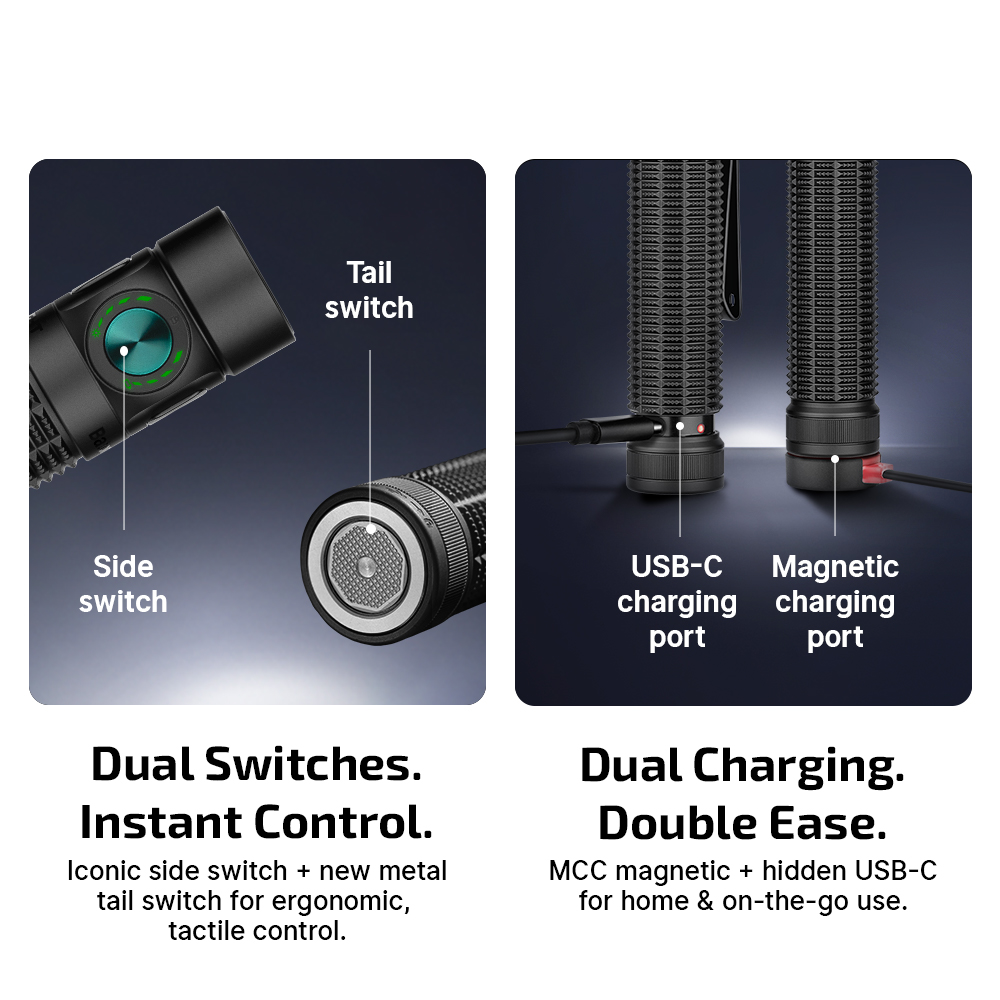
The Olight Baton 4 Pro, in Matte Black CW, serves a different role from a tiny keychain light. Its selected product description lists a side switch with five brightness levels and a textured tail switch with access to High and Turbo. For longer ordinary lighting tasks, the ability to select a suitable working level can matter more than preserving the smallest possible keyring item.
A person checking items on a shelf may want a different amount of light from someone looking farther along a clear outdoor path. Brightness adjustment helps address those changing surfaces and distances. Begin with an appropriate documented setting and direct the beam away from faces. If a bright reflection makes the object harder to see, reconsider the level and angle before deciding that still more output will solve the problem.
The two switches also create a learning task. Know which control you mean when explaining ordinary use to another adult, and use the exact manual for the required actions and starting state. Avoid assuming that a sequence learned on another Baton model transfers unchanged. More control options help when you understand them; they can confuse a person who expects every button to behave identically.
Olight lists a maximum output of 1,600 lumens for this configuration. That is a maximum-output specification, not the brightness required for reading a nearby label or a promise of continuous operation at that level. Evaluate the setting you expect to use and its documented behavior. Do not multiply a headline output by an unrelated maximum runtime to invent an all-night performance claim.
The current Baton 4 Pro manual makes the output stages clearer: Turbo is listed at 1,600 lumens for two minutes, followed by 600 lumens for 198 minutes. Its Medium setting is listed separately at 120 lumens for 18 hours and 30 minutes. These listed figures describe the specified output stages; they do not guarantee identical duration in every use. For your decision, the useful distinction is a brief maximum followed by a lower stage versus a separate lower working mode, rather than treating every runtime as time at maximum output.
The Baton 4 Pro supports MCC magnetic charging and has a USB-C port concealed by a rotating tailcap ring. Those routes can be useful in different locations. A familiar magnetic setup may suit a regular home charging place, while a suitable USB-C connection may fit travel equipment. Check the exact package contents and required charging accessories instead of assuming every compatible lead is included with every offer.
Olight describes shallow grooves and deeper indentations in the body's grip pattern. That gives your fingers defined surfaces on a larger light, which can matter when moving the beam between ordinary objects. It also means carrying a different shape from a small keychain cylinder. Examine the pocket space and retrieval position you are prepared to give it. A comfortable handheld body still needs somewhere practical to go when the task ends.
Compare functions without inventing a successor story
The i3E EOS, iUltra, and Baton 4 Pro illustrate different combinations of control, power supply, and carry format. They should not be arranged into a simple ladder in which every later-looking feature replaces everything before it. A direct replacement claim requires evidence about the actual product relationship. Your buying decision can be clearer without that claim: compare what each design asks you to do during use and afterward.
| Model and configuration | Documented control or power feature | Practical question |
|---|---|---|
| i3E EOS, Black | Head-twist activation; single AAA battery | Can you grip the head and maintain the specified battery supply? |
| iUltra, Olive Green | Detach to activate; built-in USB-C plug | Does the base stay with your keys, and can the plug reach suitable power? |
| Baton 4 Pro, Matte Black CW | Side and tail switches; magnetic and USB-C charging | Do adjustable levels and charging options justify a larger carry item? |
Compare like conditions when reading numerical specifications. Confirm the exact configuration, battery assumptions, output level, and runtime stage. A maximum beam distance describes a different aspect of lighting from total output, and neither tells you how comfortable a beam will be on a reflective surface at arm's length. Use specifications to eliminate poor fits, then consider how the controls and carrying arrangement match the task.
Separate a recurring annoyance from an imagined future need. Someone who regularly searches through a bag in dim light has a concrete reason to keep a light accessible. Someone who only occasionally needs a low setting may decide that feature is still worth having. Either choice can be reasonable. The useful distinction is knowing what problem the extra feature will solve and accepting what comes with it.
Do not treat a finish change as proof of an electrical improvement. A different color can make your own equipment easier to identify, but specifications and package contents must come from that configuration's listing. Likewise, a familiar family name does not establish that clips, charging leads, batteries, or button sequences transfer between generations. Record the complete model name before ordering support items.
Keep power and support separate from model age
Long-term usefulness depends partly on whether you can keep the actual light ready. Start with its own power arrangement: a specified replaceable cell, a built-in charging plug, or a charging connection that needs a compatible cable or accessory. These are different maintenance paths. A design that avoids one item may still depend on another, such as access to a suitable power source or keeping a magnetic base with the light.
For a replaceable-battery model, save the approved battery details with the model name. For a rechargeable model, save the charging instructions and identify the equipment used at home and away. You do not need an elaborate inventory. A short note explaining which item belongs to which light prevents a future owner or household member from relying on appearance when several similar pieces of equipment share a drawer.
A rechargeable flashlight can make frequent replenishment convenient when its charging method fits your habits. It still needs attention between uses. A light that is easy to connect at your desk may be inconvenient if your keys stay in an entrance organizer. Plan around where the item normally lives. Moving it to a charging location also requires returning it to the place where you expect to find it.
Inspect the support item itself before replacing an entire light. A missing compatible lead or worn attachment may be the actual obstacle, while the light's intended function remains useful. Confirm the exact part and compatibility through the current product information or Olight support. Do not buy a vaguely similar accessory because its photograph resembles the old one, and do not assume a listed family name includes every past version.
Current product information provides a buying reference, not a promise about indefinite supply. A page for one configuration does not establish that every color or accessory can be purchased at the same moment. Check the actual offer and support response when you are ready to order. Preserve an approved alternative power plan where appropriate instead of depending on an unconfirmed future accessory purchase.
Recognize the point when an upgrade solves a real problem
Upgrade when the existing light cannot perform the task comfortably within its intended use. A single-output keychain model may be a poor match if close reading consistently calls for a lower setting. A tiny body may be awkward for longer handheld work. A charging arrangement may become inconvenient after your daily routine changes. Those are specific reasons to compare another format, even if the familiar light still works.
Keep a useful light when its role remains short, straightforward, and easy to maintain. There is no need to assign it every job to justify keeping it. It can remain the light that stays with the keys while another model handles longer tasks. Store and carry both intentionally so the smaller one does not become forgotten clutter and the larger one does not require a search whenever it is needed.
A second flashlight should address the gap left by the first. Here, that might mean preserving an accessible keychain light while choosing a separate everyday light with useful brightness adjustment. Decide which item lives with the keys, which goes in a pocket or bag, and how each receives power. Two devices only add practical coverage when both are maintained and available in their assigned roles.
Be cautious about assigning a familiar old light a safety-critical duty simply because it has served well for ordinary errands. Personal history does not establish a certification, suitability for hazardous locations, or the condition of its battery today. Follow the requirements of the actual activity and equipment. If a task calls for specialized approved lighting, choose that equipment rather than trying to justify a general-purpose light through reputation.
You can also decline an upgrade when its main benefit does not fit your use. Someone who values maintaining approved spare cells may prefer that routine to an integrated charging plug. Someone who already replenishes devices at a desk may reach the opposite conclusion. Neither preference proves that one design has a longer physical lifespan. It identifies which everyday obligations you are more likely to fulfill.
Check how the light fits the things you carry
Lay out the everyday items that must accompany the light before buying another format. Consider the keys, wallet, phone, and bag you really use. A keychain light competes for space on the ring, while a pocket light needs its own retrieval path. Avoid judging either in isolation on an empty table. The practical question is whether you can find and handle it without dropping other belongings or digging past loose objects.
Check the carry arrangement while the light is off and follow the model's instructions for preventing unintended activation. Keep the lens clear rather than allowing fabric or loose contents to cover it during use. If another adult will borrow the light, explain where it is carried and which control is involved. This small preparation is useful with a simple model as well as a more adjustable one.
Think about where the light goes immediately after the task. A small detachable light needs to return to its base or designated place. A larger handheld needs a suitable pocket, pouch, or storage location. If your routine regularly leaves a component behind, changing that arrangement may help before another purchase does. Judge the complete cycle from retrieval through use to storage, rather than activation alone.
Evaluate an older listing by its exact identity
An older model name can appear beside a current product, a collectible finish, or equipment with an individual history. Keep those questions separate. First establish the exact model and configuration. Then compare the documented functions with your task. Finally, examine the terms and condition of the specific item offered. A useful design does not automatically make every example of it a sound purchase.
If you already own the light, gather its model marking, original instructions, and any support information before ordering replacements. Avoid identifying it only as “the little black Olight” or “an old Baton.” Small naming differences may distinguish products with different power requirements and controls. Clear identification helps support answer the right question and keeps a convenient accessory search from becoming an unsupported compatibility guess.
If an offer includes a charging accessory, identify that item separately. A photograph of a light beside a cable does not explain the cable's model, condition, or compatibility. Ask for the information needed to follow the light's instructions, and compare it with the approved equipment. Consider the effort of resolving missing details as part of the buying decision. A lower asking price cannot supply missing technical information.
Terms such as “used,” “open box,” and “refurbished” describe a different purchasing question from whether a classic design fits your needs. Do not infer battery replacement, inspection work, return rights, or warranty coverage from those words alone. Check the actual seller's written terms and ask Olight support about applicable manufacturer coverage. Keep that transaction review separate from the functional comparison in this guide.
Choose the role before choosing the model
Begin with the item you take every day and the moment when light would help. If that means brief illumination near the keys, compare the i3E EOS head-twist arrangement with the iUltra pull activation and charging plug. Consider how you hold the keys, where you can set other belongings, and how replenishment fits your week. A compact format only helps when it stays accessible without making the normal carry item cumbersome.
If the job changes brightness needs or lasts long enough that a tiny body becomes inconvenient, examine the Baton 4 Pro's adjustable levels and larger handheld format. Learn the exact controls and charging arrangement before relying on it away from home. Keep the useful keychain light if it still fills its own role. Replacement and supplementation are different choices, and either can follow from the same honest assessment of your habits.
Before ordering, name the problem in one sentence, confirm the exact configuration, and identify its power routine. Check which support items are included and which you would obtain separately. Then choose a place where the light will live between uses. That gives a classic model a fair assessment and gives a newer option a specific job to earn, without requiring either to be the answer to every lighting need.
Frequently Asked Questions
Changelog
- November 19, 2026: Product information and buying guidance reviewed.