Contents
- Identifying Your Flashlight's Charging Method
- Charging Options for USB-C and Micro-USB Flashlights
- Charging Options for Magnetic Charging Flashlights
- Charging Options for Proprietary Chargers
- What to Avoid
- How to Charge Flashlight Batteries Externally
- Conclusion: Know Your Options
- FAQ
Losing or breaking the original charger for a high-performance LED flashlight is a common problem for outdoor enthusiasts. Modern flashlights use sophisticated battery management systems and varied charging ports, making it essential to understand which alternatives are safe. Using the wrong power source can damage internal circuitry or degrade battery life. This guide outlines how to identify your flashlight’s charging requirements and find compatible power alternatives.
Identifying Your Flashlight's Charging Method
Before attempting to charge your device with an alternative, you must determine how the power enters the flashlight. Modern lights generally fall into three categories: standard ports, magnetic interfaces, or proprietary cradles.
USB-C, Micro-USB, Magnetic, or Proprietary
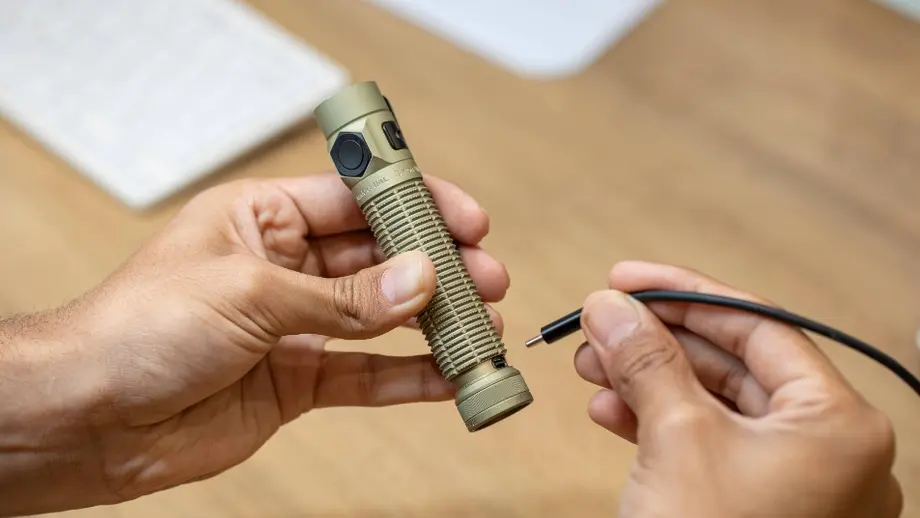
Check the body of the flashlight for a port covered by a rubber flap, a rotating ring, or integrated into the tailcap. - USB-C: An oval-shaped port that is reversible. This is the current standard for fast charging. - Micro-USB: A smaller, trapezoidal port found on older models. - Magnetic: A flat metal contact point, usually on the tailcap or side, that connects to a magnetic cable. - Proprietary: Unique pins or barrel plugs that only fit a specific brand's charging dock.
Some advanced models, like the Baton 4 Pro and Baton Ultra, offer dual charging versatility. These units feature both a hidden USB-C port (which is revealed or concealed by smoothly rotating a finely textured tailcap ring) and a magnetic tailcap, providing multiple ways to restore power if one cable is lost.
Charging Options for USB-C and Micro-USB Flashlights
Flashlights with standard USB ports are the easiest to charge without the original equipment. These ports utilize standard 5V DC power, which is the same voltage used by most consumer electronics.
Phone Chargers and Power Banks
Modern smartphone wall adapters are excellent alternatives. Most provide at least 5V/2A output. - Connect any high-quality USB-C or Micro-USB cable to your phone's wall brick. - Plug the other end into the flashlight port. - Power banks are equally effective for field use. Ensure the power bank is turned on and provides at least 1A of current for efficient charging.
Laptop USB Ports
If you are working at a desk, a laptop or PC USB port can serve as a power source. - Standard USB 2.0 ports output 500mA. - USB 3.0 (blue) or USB-C ports on laptops often provide 900mA to 2A. - Charging via a laptop is slower than a wall outlet but is safe for the battery.
Car USB Adapters
Vehicle 12V cigarette lighter adapters with USB ports are vital for outdoor travelers. - Use a high-quality car charger that regulates voltage. - Avoid "no-name" chargers that may have inconsistent voltage spikes when the engine starts. - Ensure the flashlight is secured so it does not disconnect while the vehicle is in motion.
Charging Options for Magnetic Charging Flashlights
Magnetic charging systems usually require the specific magnetic cable provided by the manufacturer. However, the "source" end of that cable is almost always a standard USB-A or USB-C plug.
Standard USB-A to Magnetic Cables
If you have the magnetic cable but lost the wall adapter, you can use any USB-A power source. - Plug the USB-A end of the magnetic cable into a standard 5V wall adapter. - Snap the magnetic end onto the flashlight tailcap. - The charging circuitry is usually built into the cable or the flashlight, meaning any stable 5V USB source is compatible.
Using a Power Bank with Magnetic Cable
For hikers and campers, the magnetic cable works perfectly with portable power banks. - This setup is ideal because it eliminates the need for an AC outlet. - The magnetic connection stays secure even if the light is placed inside a backpack while charging.
Charging Options for Proprietary Chargers
Proprietary chargers use unique shapes or pin layouts. These are the most difficult to replace with household items.
Contact Manufacturer for Replacement
If the charger uses a unique cradle or multi-pin connector, the safest route is to buy an official replacement. Using improvised wires to touch contact points is dangerous and can cause a short circuit or fire.
Third-Party Compatible Chargers (Use Caution)
Some third-party manufacturers create "universal" docks for specific brands. - Check reviews carefully before purchasing. - Ensure the output voltage matches the original charger exactly (typically 4.2V for internal lithium charging or 5V for USB-based systems). - Cheap third-party chargers often lack overcharge protection, which can ruin your flashlight battery.
What to Avoid
Safety is paramount when dealing with high-capacity lithium-ion batteries found in modern EDC flashlights.
Using Incorrect Voltage Chargers
Most flashlights charge at 5V via USB. Never attempt to use a laptop power supply (typically 19V) or an old power tool charger (12V-18V) by cutting and splicing wires. This will immediately destroy the flashlight’s driver and may cause the battery to vent or explode.
Force-Incompatible Connections
Never force a Micro-USB cable into a USB-C port or vice versa. Forcing a connection damages the delicate pins inside the port, rendering the flashlight unchargeable even with the correct cable. If the plug doesn't slide in smoothly, it is the wrong type.
How to Charge Flashlight Batteries Externally
If the internal charging port of your flashlight is broken, you can often remove the battery and charge it separately. Most high-lumen lights use standard sizes like 18650, 21700, or 26650.
- Remove the Battery: Unscrew the tailcap and slide the battery out.
- Check Battery Type: Ensure the battery is a standard lithium-ion cell (3.6V/3.7V).
- Use a Universal Charger: Use a dedicated external charger (such as those from reputable brands like Nitecore or Xtar). These chargers have spring-loaded slots that fit various battery lengths.
- Polarity Check: Always match the positive (+) and negative (-) terminals.
Note that some proprietary batteries have both poles on the same end (such as the customized 18650 batteries used in the Baton 4 Pro and Baton Ultra). These cannot be charged in standard external chargers and require the original flashlight body or a specific brand-made external dock to charge safely.
Product Specification: Baton 4 Pro / Baton Ultra
For those looking for a reliable EDC light that minimizes charging issues, the Baton series provides dual-interface options.
| Parameter | Baton 4 Pro | Baton Ultra |
|---|---|---|
| Max Output | 1,600 lumens | 1,800 lumens |
| Max Throw | 200 meters | 300 meters |
| Length | 111 mm | 113 mm |
| Weight | 114 g | 115 g |
| Battery Type | Customized 3,500 mAh 18650 (Proprietary) | Customized 3,500 mAh 18650 (Proprietary) |
| Charging Port 1 | MCC3 Magnetic | MCC3 Magnetic |
| Charging Port 2 | Hidden USB-C (Rotatable Ring) | Hidden USB-C (Rotatable Ring) |
| Max Runtime | 100 days (Moonlight) | 100 days (Moonlight) |
| Body Material | 6061 Aluminum | O-Aluminum |
| Grip Type | Anti-slip Knurling | Anti-slip Knurling |
Conclusion: Know Your Options
The best way to charge a flashlight without the original charger is to utilize the standardized USB ecosystem. USB-C and Micro-USB ports provide the most flexibility, allowing you to use phone adapters, car chargers, and laptops. For magnetic systems, you still need the cable, but any USB power source will work. If the charging port itself fails, an external universal battery charger is the most reliable backup. Always verify voltage and polarity before connecting any alternative power source to protect your investment.