Olight makes the flashlights discussed here. Olight specs, regular prices and manual quotes come from its US product pages and user manuals as of September 2026; battery figures come from the cell makers' datasheets. The runtime and battery math below is based on Olight's rated figures, not measured.
⚡ TL;DR
If your flashlight is not working, start with the battery: it may be flat, in backward or still blocked by the insulating film that ships on some new lights. Then check the contacts, lockout, tail cap, switch and driver, in that order. The first four checks need no special tools and take 5 to 15 minutes, so run them before you file a warranty claim.
This flashlight not working symptom table maps what you see to the likely cause and the check that clears it.
| What you see | Likely cause | What to do first | Check |
|---|---|---|---|
| New light, nothing happens | Insulating film still on the battery, or battery in backward | Open the cap, pull the film, confirm the positive end faces the head | 1, 2 |
| Worked yesterday, dead today | Battery drained after the light switched on in a pocket or bag | Recharge or swap the battery, then carry it locked | 1, 4 |
| A press lights the indicator but not the beam | Electronic lockout | Unlock it the way your manual describes | 4 |
| Flickers when you tap or shake it | Loose tail cap, dirty threads or dirty contacts | Tighten the cap, clean contacts and threads | 3, 5 |
| Flickers after long use | Battery close to empty | Recharge or replace the battery | 1 |
| Bright for a minute or two, then dimmer | Thermal step-down, working as designed | Use a lower mode for long tasks | 6 |
| Drops to a low level near a wall | Proximity sensor on some models | Point it away, or disable the sensor per the manual | 6 |
| Switch clicks, still dark, after all of the above | Failed switch, driver or LED | Stop and use the warranty | 7 |
📋 Table of Contents
- 1. Flashlight Not Working? The 7 Checks and Why the Order Matters
- 2. What Tools Do You Need for Flashlight Troubleshooting?
- 3. Check 1: Is a Dead Battery Why Your Flashlight Won't Turn On?
- 4. Check 2: Is the Battery In Backward or Still Wrapped?
- 5. Check 3: Corroded Contacts, Bent Springs and Debris
- 6. Check 4: Is Your Flashlight Locked Out, Not Broken?
- 7. Check 5: Why Does a Flashlight Keep Flickering When You Tap It?
- 8. Check 6: Why Does the Switch Click but the Light Stays Off or Dims?
- 9. Check 7: When Should You Send a Flashlight for Repair?
- 10. How Do I Restart My Flashlight?
- 11. Why Isn't My iPhone Flashlight Working?
- 12. Why Is My Flashlight Not Showing?
- 13. Which Olight Lights Are Easiest to Troubleshoot?
- 14. Your Flashlight Not Working Checklist
- 15. FAQ
Flashlight Not Working? The 7 Checks and Why the Order Matters
Run the seven checks from cheapest to most expensive: battery charge, battery direction, contacts and springs, lockout, tail cap and threads, switch, and finally driver or repair. The first four cost nothing and fix problems you can see. Only the last one needs a technician. Skipping ahead wastes time, because a switch cannot be judged until you know the battery behind it is good.
Every flashlight is a loop: battery, contacts, body or tail cap, switch, driver and LED. Light appears only when every link carries current. The battery is the one part that runs out on its own, so it comes first. The switch and driver come last because you cannot fix them without tools.
This order also works across Olight's flashlights, from AAA tail-switch lights to rechargeable side-switch models, because each check isolates one link in the loop.
This table lays out the seven checks with a rough time budget for each. The times are editorial estimates for a person working at a kitchen table, not measurements.
| Check | What it rules out | Rough time | Tools needed |
|---|---|---|---|
| 1. Battery charge | A flat or over-discharged cell | 1 to 2 minutes | Spare cell, charger or multimeter |
| 2. Polarity and fit | Backward cell, insulating film, wrong cell size | 1 minute | None |
| 3. Contacts and springs | Oxidation, leak residue, bent spring, debris | 3 to 10 minutes | Swabs, soft toothbrush, gloves |
| 4. Lockout | A locked switch mistaken for a fault | 30 seconds | The manual |
| 5. Tail cap and threads | A cap that is not fully seated, dirty threads | 2 to 5 minutes | Soft brush, cloth |
| 6. Switch behavior | Mode memory, step-down, proximity dimming, a stuck switch | 2 minutes | The manual |
| 7. Repair decision | Driver, LED or internal battery failure | 10 minutes to gather records | Receipt, photos |
What Tools Do You Need for Flashlight Troubleshooting?
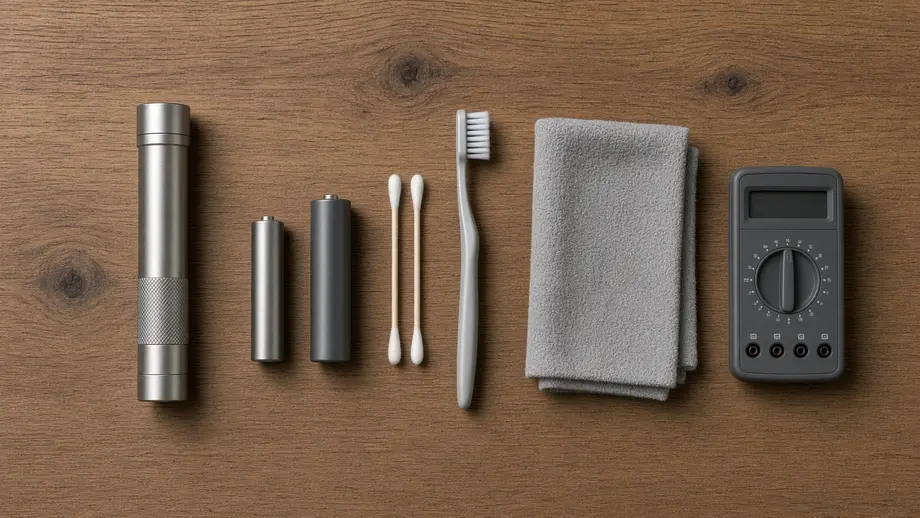
For flashlight troubleshooting you need a known-good spare battery of the same type, a charging cable you trust, cotton swabs, a soft toothbrush and a clean, dry cloth. A basic digital multimeter helps but isn't required. If you find crusty white residue from a leaked alkaline battery, add household gloves, safety glasses and diluted white vinegar or lemon juice.
Duracell's cleanup advice for leaked cells is direct: "Wear household gloves and glasses. Using a toothbrush or cotton swab, remove battery leakage from the electrical contacts." For alkaline, NiCd and NiMH leakage it suggests "a mixture of equal amounts of diluted vinegar or lemon juice with water (50/50 ratio)," according to the Duracell battery FAQ.
This table lists the tools and consumables, what each is for and where it matters most.
| Item | Used for | Note |
|---|---|---|
| Known-good spare battery | Swap test in Check 1 | Same size and type your manual lists |
| Known-good charging cable and USB port | Ruling out the charger on rechargeable lights | Many Olight lights use a magnetic cable |
| Digital multimeter (DC volts) | Reading cell voltage | Optional; compare with the datasheet table below |
| Cotton swabs and a soft toothbrush | Cleaning contacts and threads | The tools Duracell names for removing leakage |
| White vinegar or lemon juice, diluted 50/50 | Neutralizing alkaline leak residue | Dry the light fully before inserting a new cell |
| Household gloves and safety glasses | Handling leak residue | Wash skin with soap and water after contact |
| Phone camera | Photos for a warranty claim | Shoot the contacts, the cell and any damage |
Check 1: Is a Dead Battery Why Your Flashlight Won't Turn On?
A drained or over-discharged battery is the first thing to rule out when a flashlight won't turn on. The quickest proof is a swap: put in a fresh cell of the same type, or fully charge a rechargeable light, and try again. If a multimeter is handy, compare the reading with the cell's datasheet floor voltage. If it lights on a fresh cell, the old cell was the problem.
Different chemistries start and end at different voltages, so one number does not fit every cell. This table uses the makers' own datasheets. The end voltage is where each maker stops counting rated capacity, so a resting reading at or below it means the cell is empty.
| Cell type | Datasheet example | Nominal voltage | Rated to (end voltage) | What a low reading means |
|---|---|---|---|---|
| Alkaline AA | Energizer E91 | 1.5 V | 0.8 V | At or below 0.8 V, the cell is spent |
| NiMH AAA | Energizer NH12-800 | 1.2 V | 1.0 V | 1.2 V is normal for a charged NiMH, not a weak cell |
| Lithium CR123A | Energizer 123 | 3.0 V | 2.0 V | At or below 2.0 V, the cell is spent |
| Li-ion 21700 | Molicel INR-21700-P45B | 3.6 V (4.2 V full charge) | 2.5 V | At or below 2.5 V, recharge now; a 0 V reading can mean the protection circuit tripped |
Sources: the Energizer E91 datasheet, Energizer NH12-800 datasheet, Energizer 123 datasheet and Molicel P45B datasheet. Olight doesn't publish end voltages for its customized cells, so Molicel stands in as a 21700 example.
The NiMH row is easy to misread. A fully charged NiMH cell sits at 1.2 V, which is 1.2 ÷ 1.5 = 80% of an alkaline cell's label voltage. Judge it by alkaline standards and you would throw away a full battery.
Why a light can die over a weekend. A press you never noticed does not need Turbo to empty a battery. Even a low mode runs out within days. Take a light switched on in a drawer or bag on Friday night and found on Sunday night, 48 hours later. Based on Olight's rated runtimes, not measured:
- Olight Baton 4: Low is rated 12 lumens for 35 hours. 35 is less than 48, so a Baton 4 left on Low from Friday night is flat about 13 hours before you find it.
- Olight Warrior 3S: Low is rated 15 lumens for 130 hours. 130 ÷ 24 is about 5.4 days, so it survives the weekend but not a week-long trip.
The size of the cell sets the margin: a small 16340 light has little slack, a 21700 light has more. Either way, the fix is the lockout in Check 4. For how rated numbers relate to real use, see this guide to flashlight runtime.
What the red indicator really leaves you. The Baton 4 user manual shows the battery indicator green at 60% or more, from 10% to 60% and from 5% to 10%, and red below 5%. The manual lists the cell as 650mAh 3.6V (2.34Wh), and 0.65 Ah × 3.6 V = 2.34 Wh checks out. Five percent of that is 0.117 Wh. If the remaining energy drains at the same average rate as the rated runtime, red means about 5% × 8 hours = 24 minutes at Med (60 lumens) or 5% × 720 hours = 36 hours at Moon (0.5 lumens, rated 30 days). These are estimates based on Olight's rated runtimes, not measured, and output will fall as the cell nears empty.
The same arithmetic turns each Baton 4 indicator band into time at Medium. This table uses the manual's bands and the rated 8 hours at 60 lumens, based on Olight's rated runtimes, not measured.
| Indicator state (Baton 4 manual) | Charge left | Time left at Medium (60 lumens, rated 8 h) | What to do |
|---|---|---|---|
| Green, 60% or more | 60% to 100% | About 4.8 to 8 hours | Nothing; the battery is not your problem |
| Green, 10% to 60% | 10% to 60% | About 48 minutes to 4.8 hours | Fine for a task, charge before a night out |
| Green, 5% to 10% | 5% to 10% | About 24 to 48 minutes | Charge soon |
| Red, below 5% | Under 5% | Under about 24 minutes | Charge now |
Rechargeable lights that refuse to wake. Lithium-ion cells carry a protection circuit. Battery University says this safeguard "turns the battery off and makes it unusable if over-discharged," and that, depending on the maker, it cuts off "between 2.2 and 2.9V/cell" (Battery University BU-808a). Leave the light on its own charger for a while before you judge it. The Baton 4 manual shows the indicator red while charging and green when charging is complete, with a charging time of about 1 hour.
Tip: If you own a 21700 light such as the Warrior 3S or Olight Perun 3, a spare Olight 21700 battery ($26.95 regular price, September 2026) turns Check 1 into a 30-second swap. Olight lists its customized 5000mAh 3.6v cell as designed for both lights. For a wider look at cell sizes, see this comparison of flashlight battery types.
Check 2: Is the Battery In Backward or Still Wrapped?
A new flashlight that won't light may have its battery in backward or still sealed off by a plastic insulating film. Open the tail cap, look for a thin film or tab over the battery end and pull it out. Then confirm the positive end faces the direction your manual shows. On the i3T 2 EOS, for example, positive goes toward the head.
Olight's manuals make both points in plain words. The Baton 4 manual opens its operating steps with "Remove the insulating film before use." The i3T 2 EOS manual tells you to unscrew the tail cap "ensuring that the positive end of the new battery faces the flashlight head, and then screw the tail cap back on." You can read both in the Baton 4 user manual and the i3T 2 EOS user manual.
Why a multi-cell light can glow with one cell reversed. Cells in series add their voltages, and a reversed cell subtracts. With 1.5 V alkaline cells (the nominal voltage on Energizer's E91 datasheet):
- Two cells, one reversed: 1.5 − 1.5 = 0 V, so the light stays dark.
- Three cells, one reversed: 1.5 + 1.5 − 1.5 = 1.5 V, one-third of the 4.5 V the light expects.
That second case can still produce some light, which is why Duracell cautions that "Some equipment using three or more batteries may appear to work properly even if one battery is inserted incorrectly," and that this "may lead to battery leakage or rupture." A dim multi-cell light deserves a look at every cell.
Cell size and shape matter too. Use only the cell your manual lists. Olight lists customized cells for the Baton 4 (650mAh 3.6V IMR 16340), the Warrior 3S and the Perun 3 (3.6V 5000mAh 21700). The i3T 2 EOS takes a standard AAA, and Olight's product page adds that a 10440 Li-ion cell "with PCB protection (max length 44 mm)" also fits. A cell that is shorter, or shaped differently at the positive end, may not reach the contact, so compare it with the original.
Don't mix old and new cells in a multi-cell light either. Streamlight's battery guidance says "Don't mix old and new batteries, or mix different types or makes of batteries," and SureFire's battery safety page says to "REPLACE ALL batteries at the same time and DO NOT load batteries backward" (Streamlight, SureFire).
Check 3: Corroded Contacts, Bent Springs and Debris
Dirty or damaged contacts stop current even when the battery is full. Look at three spots: the button or plate in the head, the spring in the tail cap and both ends of the battery. Dull gray film, green or white crust, a flattened spring or a grain of sand can each break the circuit. Wipe them with a clean cloth or dry swab, brush out grit, and try the light again.
Work through the contacts in this order:
- Battery ends. Wipe both ends with a clean cloth. Duracell's FAQ says, "For best performance, keep battery contact surfaces and battery compartment contacts clean."
- Head contact. Shine another light into the tube. Wipe the center contact with a dry swab. If you see white or green crust, treat it as leak residue and follow the Warning below.
- Tail spring. A spring should stand proud and push back when you press it. If it has been crushed flat, the battery may not touch it once the cap is on. Don't bend or pull it back into shape. The i3T 2 EOS manual says "Do not disassemble the product," and its warranty excludes "repair by anyone other than an authorized retailer or Olight itself," so a damaged spring is a warranty item.
- Debris. Tap out lint, sand and grit from the tail cap, then brush the threads.
Warning: Duracell advises limiting your handling of a battery that is "wet or covered with a white powdery substance." Wear gloves and glasses, lift the residue with a swab dampened in the 50/50 vinegar or lemon juice mix Duracell recommends, then let the light dry completely. Duracell adds that if eye contact occurs, you should "immediately flush the eyes with running water for at least 15 minutes and then seek immediate medical assistance."
Prevention is easier. Duracell's FAQ warns that "Many devices don't power off completely when switched off and, after time, may cause the batteries inside to leak," and the i3T 2 EOS manual says to remove the battery for long-term storage. Olight's existing guide explains how to clean flashlight battery corrosion step by step, including rusty contacts.
Safety note: Lithium-ion cells are different. The U.S. Fire Administration says to "Stop using lithium-ion batteries if you notice an odor, change in color, too much heat, change in shape, leaking or odd noises" (USFA). Do not try to clean or reuse a swollen or leaking lithium cell. Olight's i3T 2 EOS manual says the same for any cell: "Don't use damaged, deformed battery, or with broken sleeve." Recycle it and replace it. If a battery or charger has overheated or failed, search the U.S. Consumer Product Safety Commission's recalls and product safety warnings by product name before you buy the same one again.
Check 4: Is Your Flashlight Locked Out, Not Broken?
Lights with an electronic switch, including the Baton 4, can be locked so the button ignores normal presses, and a locked light looks exactly like a dead one. On the Baton 4, a single press that lights the battery indicator but no beam means the switch is locked. Unlock it with the sequence in your own manual; the Baton 4 uses a press and hold of 1 second or more.
The Baton 4 is a clear example. Its manual says: "To lock the switch button, when the flashlight is off, press and hold the button (for about 2 seconds) until the Moonlight mode turns on and off." Once locked, "press the button once to display the remaining battery level without turning on the flashlight. Press and hold the button for 1 second or more to unlock the button and activate Moonlight mode."
So a Baton 4 whose button is held down while it is off, for example by keys in a pocket, can lock itself: Moonlight blinks on and off, and from then on a single press shows only the battery level. Hold for a second and Moonlight returns.
Other lights reduce accidental presses in other ways. Olight describes the Perun 3's side button as "concave to avoid unwanted activation during transit or storage." Not every light has a lockout. The i3T 2 EOS manual lists none; its tail switch turns the light on only when you "Press the tail switch firmly (you will hear a click)," while a slight press gives momentary light. If a tail-switch light is dead, skip ahead to Check 5.
Check 5: Why Does a Flashlight Keep Flickering When You Tap It?
Flickering that changes when you tap, twist or shake the light points to a loose connection at the tail cap, the threads or the contacts. Screw the cap down fully until it stops, then try again. If the flicker continues, remove the cap, clean the threads and contact surfaces with a dry cloth or soft brush, and check that the O-ring is seated and undamaged.
On a tail-switch light such as the Olight i3T 2 EOS, the switch lives in the tail cap, and the i3T 2 EOS manual installs the battery through that same cap. Every bit of current passes through it, so a cap that is not screwed fully home is the first suspect when the light flickers.
Use this order when a light flickers:
- Screw the tail cap back on fully by hand, the last step in the i3T 2 EOS manual's battery instructions.
- Tap the light against your palm. If the flicker follows the tap, the fault is mechanical.
- Remove the cap, wipe the threads and brush out grit.
- Check the O-ring for cuts or twists; a damaged one can let water in. The i3T 2 EOS box includes two spare O-rings, listed in the package contents of its manual.
- Clean the spring and battery ends as in Check 3, reassemble and tap again.
A flicker that does not follow a tap is different. The i3T 2 EOS manual says: "It is normal that the light flickers when the battery is close to running out." If the flicker came on gradually after long use, go back to Check 1.
Note: Some lights flicker by design. Strobe modes flash on purpose; the Baton 4, for example, lists strobe as "Yes, 13Hz at 1,300 lumens." If a quick triple press started a strobe, a single press or a press and hold exits it, according to the Baton 4 manual.
Check 6: Why Does the Switch Click but the Light Stays Off or Dims?
When the switch clicks but the light stays off, or dims unexpectedly, the switch type decides what to check next. A mechanical tail switch should click firmly and light instantly. An electronic side switch runs through a driver with lockout, memory, timers and heat protection, so odd behavior may be a feature. Read the manual's mode chart before you treat it as a failure.
Mechanical tail switches. The i3T 2 EOS manual describes turning it on as: "Press the tail switch firmly (you will hear a click)." A light press gives momentary on. If you get a click but never any light, even with a fresh cell, clean contacts and a tight cap, the switch or LED is the likely suspect. That is a repair item.
Electronic side switches. Five features can look like faults:
- Mode memory. The Baton 4 manual says "Turbo mode will be memorized as High mode; High mode output will last for 1 minute before switching to Medium mode." A light that comes back dimmer than you left it is following that rule.
- Auto shut-off timers. The Baton 4 can be set to turn itself off after 3 or 9 minutes. If it keeps going dark on schedule, a timer is on. The manual says the light flashes "once to indicate that the short period is set, and twice for the long period," and that you switch between them if you "double-press and hold the button during a timing period."
- Temperature limits. The Baton 4 and i3T 2 EOS manuals both list a working temperature of 0 to 40°C (32 to 104°F). The i3T 2 EOS manual adds: "Don't store, charge or use this light in a car where inside of temperature may be over 60°C, or similar places." A light pulled from a freezing truck or a hot dashboard may need to reach room temperature before you judge it.
- Proximity sensors. Olight says the Warrior 3S has a built-in proximity sensor that "drops the brightness level, protecting against any nearby objects while turned on high, turbo or strobe mode." It can be disabled by "double-pressing the side switch within 5 seconds of auto-dimming." A sudden drop when you point the light at a wall up close is the sensor doing its job.
- Thermal step-down. Olight's high-output lights reduce their own output as they heat up. Olight's guide on why a thermal step down flashlight dims on turbo explains the physics.
Dual-switch lights. The Warrior 3S has both a side switch and a two-stage tail switch that Olight says can "Activate direct turbo or strobe with a single press." If one switch works and the other doesn't, the battery is likely fine and the fault sits in the silent switch.
Check 7: When Should You Send a Flashlight for Repair?
Send a flashlight for repair when it stays dark or erratic after the first six checks, when it shows physical damage, or when a rechargeable model will not charge on a known-good cable. At that point the fault is likely inside the driver, LED, switch or built-in battery. Don't open it: the i3T 2 EOS manual says "Do not disassemble the product." Gather your receipt, photos and notes first.
This table sorts common findings into fix-it-yourself and send-it-in.
| Finding | Fix it yourself or send it in | Why |
|---|---|---|
| Works with a fresh or fully charged cell | Fix it yourself | The old cell was the fault |
| Works after cleaning contacts or tightening the cap | Fix it yourself | A dirty or loose connection was the fault |
| Unlocks with the manual's sequence | Fix it yourself | Lockout, not a fault |
| Dark with a known-good cell, clean contacts, tight cap and no lockout | Send it in | Switch, driver or LED failure |
| Rechargeable light shows no charging indicator on a known-good cable and port | Send it in | Charging circuit or built-in battery |
| Water or fog inside the lens | Send it in | The seal has failed |
| Cracked lens, bent body or burnt smell | Send it in | Physical or electrical damage |
| Swollen, hot or leaking lithium-ion cell | Stop using the cell; replace it | USFA advises stopping use |
Three clear signs it is time for repair:
- The light fails the swap test with a known-good cell after Checks 2 to 6 are done.
- You see physical damage, water inside the lens or a burnt smell.
- A rechargeable light shows no charging indicator on a cable and port that work with another device.
What to prepare before you contact support:
- Proof of purchase. The FTC's consumer guide says, "Save your product receipt with the warranty. The receipt proves the date you bought the product and that you're the original product owner" (FTC).
- The model name and, if printed, the serial number.
- Photos of the contacts, the battery and any damage.
- A short list of the checks you ran and what happened.
Where to send it depends on how long you have owned it. The warranty section in the Baton 4 user manual reads: "Within 30 days of purchase: Contact the original seller for repair or replacement." Then: "Within 5 years of purchase: Contact Olight for repair or replacement." It adds, "Olight offers a one-year warranty for all rechargeable batteries," and lists the USB magnetic charging cable at one year. Terms can differ by model, so check your own manual. Olight's US site lists cs.us@olight.com; the Baton 4 manual lists cs@olightstore.com.
This table turns those Baton 4 warranty terms into a quick decision by ownership age.
| Time since purchase | Who to contact | What the Baton 4 manual covers |
|---|---|---|
| 0 to 30 days | The original seller | Repair or replacement |
| 31 days to 1 year | Olight | Flashlight repair or replacement; rechargeable battery and magnetic cable also covered |
| 1 to 5 years | Olight | Flashlight repair or replacement; the one-year battery and cable terms have ended |
| Over 5 years | Olight | Outside the stated terms; ask about repair options |
How Do I Restart My Flashlight?
To restart a flashlight, cut its power and restore it: unscrew the tail cap or remove the battery, wait a few seconds, then reassemble and switch on. That cuts power to the driver so it starts over. On a rechargeable light with a built-in battery, connect the charger instead. If a press lights the battery indicator but not the beam, try the unlock sequence before you restart.
None of the four Olight lights in this guide lists a reset button, so a power cycle is the restart. To return a light to a known starting mode, use the manual's default-mode setting. The i3T 2 EOS manual, for instance, sets the initial brightness with five light presses, holding the fifth, or nine firm presses.
A light that sat dead in a drawer for months needs care. Battery University warns, "Do not boost lithium-based batteries back to life that have dwelled below 1.5V/cell for a week or longer." Charge it on its own charger and watch for heat or swelling.
Why Isn't My iPhone Flashlight Working?
An iPhone flashlight can stop working when the phone gets too hot, because Apple says the camera flash may be temporarily disabled to protect the phone. It can also vanish if the control was removed from Control Center. Let the phone return to room temperature, then try the flashlight from Control Center, Siri or the Lock Screen. If it still fails, contact Apple Support.
Apple says iPhone is designed for ambient temperatures between 0º and 35º C (32º to 95º F), and that when the interior gets too warm, "The camera flash or other camera features might be temporarily disabled" (Apple Support). A phone left on a car dashboard, or used for navigation in the sun, can lose its flashlight until it cools down.
Try these steps in order:
- Let the phone cool. If a temperature warning appears, Apple's steps are: "Turn off your device," move it somewhere cooler, away from direct sunlight, and let it cool down.
- Tap the flashlight in Control Center again, or ask Siri to "turn on the flashlight."
- If the control is missing, add it back as described in the next section.
- Contact Apple Support if the LED stays dark on a cool phone.
A phone light has hard limits on runtime and reach, a point covered in more depth in phone flashlight vs real flashlight.
Why Is My Flashlight Not Showing?
If the flashlight button is missing from your phone, it has probably been removed from Control Center on iPhone or moved off the first Quick settings page on a Galaxy phone. On iPhone, open Control Center, tap Add a Control and pick the flashlight. On a Galaxy phone, swipe left in Quick settings to find the Flashlight icon, or edit the panel to add it back.
Apple's guide to customizing Control Center says you can "rearrange, add, and remove controls," and that you add one by tapping "Add a Control at the bottom of the screen to open the controls gallery, then tap a control to add it to Control Center." Apple's flashlight guide lists other ways in too: Siri, the Lock Screen button and, on some models, the Action button.
On Galaxy phones, where Quick settings opens with a swipe down from the top right, Samsung notes that "Depending on your setup, you may need to swipe left to see the Flashlight icon. You can also rearrange the button order or add icons to the panel based on your preference."
Which Olight Lights Are Easiest to Troubleshoot?
The easiest Olight light to troubleshoot anywhere is the i3T 2 EOS, because it runs on a standard AAA you can buy at any store and uses a simple tail switch. The Baton 4, Warrior 3S and Perun 3 give more information through battery indicators, but they rely on Olight's customized cells and magnetic charging cables, so keep a spare cable or cell on hand.
Olight i3T 2 EOS ($19.99 regular price, September 2026). In a failure, the hard part is getting a working cell fast. Its manual lists three cells that fit: a 1.5V AAA alkaline (included), a 10440 lithium battery or a AAA NiMH. Specs list High at 200~100 lumens for 7+28 minutes and Low at 5 lumens for 21 hours, with IPX8 water resistance. The product page conflicts on maximum output: the Specs list 200 lumens, while the Highlights say a 10440 cell "can boost the maximum output up to 300 lumens." Read 200 lumens as the AAA rating. Its limit is runtime: it is a pocket backup, not a work light.
Olight Baton 4 ($54.99 regular price, September 2026). Its indicator tells you battery level even while locked, which makes Checks 1 and 4 fast. Specs list 1,300 lumens, 7,225 candela, 170 m and IPX8, with Moon at 0.5 lumens for 30 days. The limitation is the customized 650mAh 16340 cell. It charges on the MCC 1A magnetic cable in the Standard box or in the Baton 4 charging case, which comes with the Premium edition and sells separately for $39.99 (regular price, September 2026). Carry one of the two on trips.
Olight Warrior 3S ($119.95 regular price, September 2026). Olight lists 2,300 lumens, 23,000 candela, 300 m, IPX8 and a 4-level battery indicator around the side switch. Dual switches help isolate a switch fault. The limits are size, at 5.47 in (139 mm) and 6.21 oz (176 g), and a proximity sensor that surprises owners who don't know about it.
Olight Perun 3 ($89.99 regular price, September 2026). You can't see a headlamp's switch on your head, but the Perun 3 comes out of its headband to work as a handheld light, and its concave button resists accidental presses. Specs list 3,000 lumens, 6,400 candela, 160 m, IP68, and Moon at 5 lumens for 20 days. Olight notes the headlamp bracket is metal and "is expected to scratch the body of the torch if taken in / out repeatedly."
This table compares the four lights on the features that matter when one stops working.
| Light | Battery | Charging | Switch | Battery indicator | Water rating | Regular price (September 2026) |
|---|---|---|---|---|---|---|
| Olight i3T 2 EOS | 1 x AAA alkaline, AAA NiMH, or protected 10440 (max 44 mm) | No built-in charging listed | Tail switch | None listed | IPX8 | $19.99 |
| Olight Baton 4 | Customized 650mAh 3.6V IMR 16340 | MCC 1A magnetic cable or Baton 4 charging case | Side switch | Yes, by percentage band | IPX8 | $54.99 |
| Olight Warrior 3S | Customized 3.6V 5000mAh 21700 | MCC3 USB magnetic cable | Dual switch | 4-level | IPX8 | $119.95 |
| Olight Perun 3 | Customized 3.6V 5000mAh 21700 | MCC3 magnetic cable | Side switch | Yes, shown in the user manual | IP68 | $89.99 |
Spare magnetic cables and other parts are listed under Olight's flashlight accessories.
Your Flashlight Not Working Checklist
Work down this list the next time your flashlight is not working, and stop as soon as the light comes back. Most steps need only your hands and the manual. If you reach the last step with no light, you already hold everything support will ask for.
- Swap in a known-good cell or fully charge the light. Read the voltage if you have a meter.
- Pull any insulating film and confirm the positive end faces the head.
- Wipe the battery ends, the head contact and the tail spring. Clean leak residue with gloves on.
- Try the unlock sequence from the manual.
- Tighten the tail cap fully; clean the threads and check the O-ring.
- Read the mode chart for memory, timers, proximity dimming and step-down.
- Photograph the light, find your receipt and contact the seller or Olight.
- Next time, lock the light before it goes in a bag, and store drawer lights with the battery out.
FAQ
Changelog
- September 24, 2026: First published.